Troubleshooting Unfilled Impressions in GAM: A Step-by-Step Ad Ops Checklist
An unfilled impression in Google Ad Manager is an ad request that returned no ad because no line item was eligible to serve. The pageview still happened: the slot rendered blank, the user saw a hole in the layout, and your reporting counted an ad request that earned nothing. Google's metric for this is blunt arithmetic: total ad requests minus total code served count, covering requests that went to Ad Manager, AdSense and Ad Exchange and came back empty. One empty response can come from line item setup, a broken fallback layer, a mediation chain, floors set above the market, or a filter doing its job, and each cause has a different fix, so the audit below runs in a deliberate order: measure, classify, repair eligibility, close the waterfall, then tune price.
We are OnlyMedia: an ad network, an SSP and an agency in one company. Supply side, we run Google Ad Manager, AdX and MCM for thousands of publisher partners, and the sequence here is the one we work through when fill rate drops. It is the same audit we run across our curated demand network, where every publisher sits above one million monthly pageviews and we pay Net 30, CPM based, so every step in it has run against real ad units and real revenue, not a sandbox.
What Google counts as unfilled
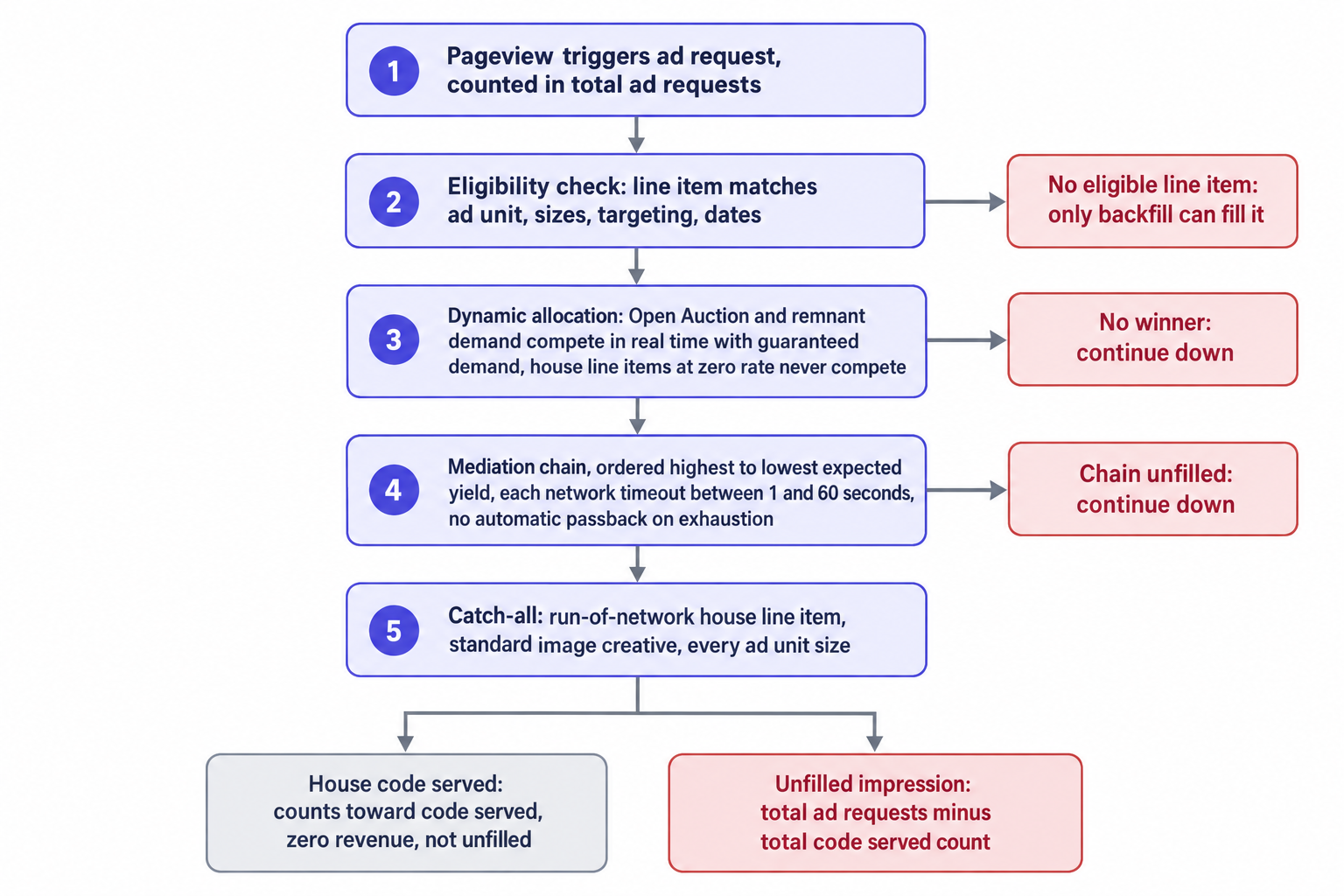
Google defines an unfilled impression, also called a blank ad, as an ad request that didn't return an ad because none were eligible to serve, and the definition plus the full fallback procedure live in Google's unfilled impressions guide. The reporting metric widens the lens: unfilled impressions count ad requests to Ad Manager, AdSense and Ad Exchange that didn't return an ad, and the math is total ad requests minus total code served count.
Two consequences shape the whole audit. First, a house creative that serves counts toward code served, so a working catch-all empties the unfilled bucket without adding revenue; track unfilled rate and house fill rate as separate lines, because a rising house rate hides a demand problem even when unfilled looks healthy. Second, the metric spans the entire backfill stack, so an AdX request that returns nothing inflates the same number as a line item with mismatched targeting. Only segmentation tells those apart, which is Step 1.
Step 1: Measure the leak by segment, not sitewide
Pull the unfilled rate per ad unit, per size, per country and per device across a full week rather than a single day, because traffic mix moves the number. Compute it as unfilled impressions divided by total ad requests, then lay it beside fill rate, CPM and revenue for the same segments. The pattern points at the failing layer:
- Unfilled concentrated in one ad unit, with sibling units near zero, points at eligibility: a creative size that doesn't match, targeting that excludes the unit, or a flight that ended.
- Uniform growth across every unit points at demand and pricing: floors, bid depth, or a broken fallback.
- Unfilled concentrated in one browser or one country points at identifiers: sessions without cookies or consent starve frequency-capped line items.
- Unfilled only in video, or only in one slot type, points at the player and VAST plumbing before it points at demand.
At OnlyMedia, our console refreshes delivery stats every ten minutes: CPM, fill rate, ad requests, pageviews, revenue, countries, devices and video detail, all with API access. Ten-minute granularity surfaces a regression within the hour, separates a real trend from an intra-day dip, and lets you script the segmentation instead of hand-building it weekly. Fix the baseline before you change anything: the rest of this checklist only works if you can compare the post-fix number against the pre-fix number for the same ad unit and size.
Step 2: Classify each empty response with the Troubleshoot tab
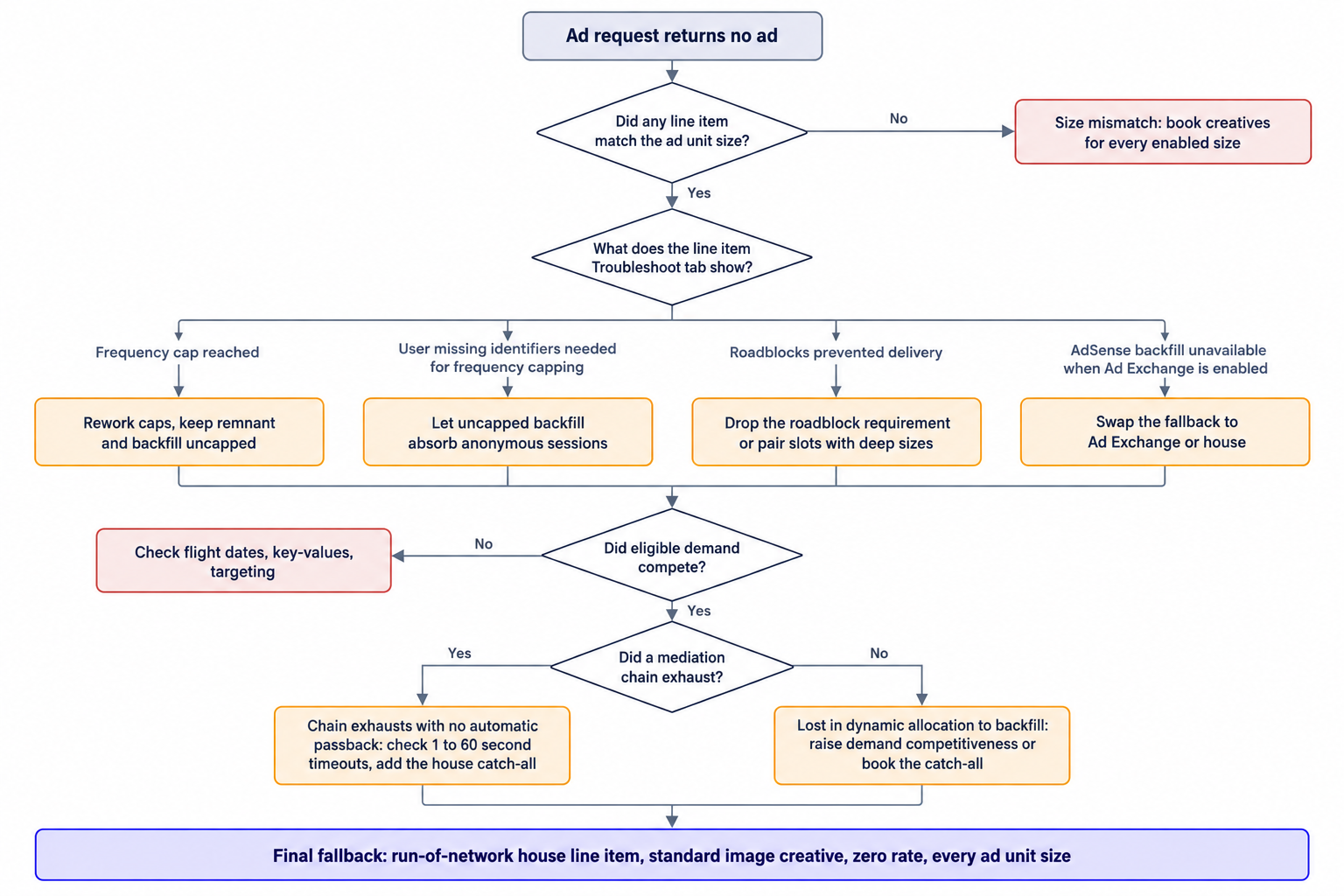
Every empty response has one of two root causes: no line item was eligible to serve, or eligible demand lost and the fallback failed too. The line item Troubleshoot tab names the specific non-delivery cause per line item, and it converts guesswork into a checklist. Google's documented causes include:
- Frequency cap reached, or the user missing the identifiers frequency capping needs.
- Lost in dynamic allocation to backfill.
- Roadblocks prevented delivery.
- AdSense backfill unavailable when Ad Exchange is enabled.
Sample the tab across your top line items and sizes over the week you just measured; a cause distribution across a segment tells you more than any single row. One entry needs context before you act. Dynamic allocation lets all non-guaranteed demand, Open Auction and remnant line items, compete in real time with guaranteed demand, so "lost in dynamic allocation to backfill" means a reserved line item lost that real-time contest and the backfill layer then failed to fill. House line items carry a zero rate and never compete through dynamic allocation, which is exactly why they work as the last resort: they cannot take impressions away from paid demand.
Step 3: Repair eligibility before touching pricing
Eligibility failures are configuration failures, and they fix cheaply. Work this list top to bottom:
- Match creatives to declared sizes. A line item booked with 970x250 creatives never serves into a slot that declares only 728x90. Multi-size ad units need coverage for every enabled size, and the size-by-size report from Step 1 shows which size leaks.
- Verify flights and status. A line item that ended, or that hit its impression goal, stops serving without any error surfacing on the page.
- Confirm key-values at request time. A line item targeting key-values the tag never passes becomes ineligible on every request, and only the Troubleshoot tab shows it.
- Rework frequency caps that starve anonymous traffic. Frequency capping needs identifiers, and Google lists "user missing identifiers needed for frequency capping" as a documented cause. Sessions without cookies or consent fall out of capped line items entirely, so keep hard caps on premium and sponsored items, and let uncapped remnant and backfill demand absorb the anonymous remainder.
- Relax roadblocks. A roadblock needs every slot in the set, so one blocked slot holds back the whole set. If the tab shows roadblocks prevented delivery, drop the roadblock requirement on that campaign or pair roadblocked slots with sizes that have demand depth.
- Reset backfill expectations. AdSense backfill is unavailable when Ad Exchange is enabled, so a fallback plan that names AdSense needs a rewrite: the catch-all must be an Ad Exchange line item, a house line item, or both.
Step 4: Book the catch-all fallback Google prescribes
Google's primary fix is a run-of-network house line item, or another catch-all remnant line item type like Ad Exchange, booked for every possible ad unit size. The house item should use a standard image creative, because users who deactivated JavaScript won't see custom creatives, and the standard image renders in conditions where custom creative code fails.
Set it up once, then leave it alone: run-of-network targeting, every enabled size, no frequency caps, no end date. The zero rate does the prioritization for you, since house line items never compete through dynamic allocation, so the catch-all serves only when guaranteed demand, remnant line items and Open Auction all decline. That is correct behavior for a safety net: it cannot cannibalize paid demand, and it converts blank slots into controlled, measurable house impressions.
Then watch the net as closely as the unfilled number. House impressions count as code served, so they leave the unfilled metric, but they earn nothing; a rising house rate means upstream demand declined more requests, and unfilled rate alone will not show it. Report house fill rate next to unfilled rate every week. If you want the safety net to earn, book an Ad Exchange catch-all alongside it: AdX competes through dynamic allocation, fills with paid demand when it can, and leaves the house item for genuine leftovers.
Step 5: Audit mediation chains for silent exhaustion
If your GAM setup routes ad units through mediation, the chain adds a failure mode the Troubleshoot tab will not name for you. Per how mediation chains work in Google's documentation: the chain orders ad networks from highest to lowest expected yield, each call to an ad network carries a dynamic timeout value between 1 and 60 seconds, and if none of the networks in the chain fill, the request stays unfilled, because no automatic passback to the ad server fires.
Three consequences for operations:
- The chain's tail is unfilled by design unless you close it. Place the house catch-all after the chain, or the last network's empty response becomes your blank slot.
- Timeouts compound. With per-network timeouts between 1 and 60 seconds, a long chain can hold a request well past the point where the user stopped looking; audit realized timeouts against viewability, and cut networks that neither fill nor respond fast.
- Expected yield decays. Reorder the chain monthly against realized CPM and fill per network, because the highest-yield network last quarter is not the highest-yield network this quarter.
Mediation is the older architecture: sequential calls, sequential timeouts, sequential chances to return nothing. A unified auction removes the sequence, which is the next step.
Step 6: Consolidate demand into one auction
Sequential demand fails sequentially. Our SSP runs one unified auction per impression: AdX via MCM, Prebid header and server-side demand, and OpenRTB 2.6 seats, with managed floors in one place. Every demand source bids once, the auction picks one winner, and the request either serves against the entire market or fails against the entire market, with no chain to exhaust and no passback to forget.
Floors decide which of the two outcomes you get. Managed floors set above what buyers clear manufacture unfilled inventory out of healthy demand, and the fix is a floor test by ad unit and geo, not a demand hunt. The mechanics underneath, covered in our notes on auction mechanics and reserve prices, include expected-value ranking, first-price with bid shading, and how reserve prices interact; operationally, raise a floor only where bid depth supports it, and track unfilled rate as the guardrail metric during the test.
Step 7: Price your filters instead of just running them
A curation layer sits in front of every auction we run: managed floors, demand mapping, whitelists, pre-bid brand safety filtering, and MFA filtering aligned with the IAB Content Taxonomy. Filters remove bids before any auction starts, and some of that removal lands in the unfilled metric. That part is deliberate: MFA filtering aligned with the IAB Content Taxonomy blocks revenue we refuse on quality grounds, and we treat those blocks as non-negotiable.
Deliberate unfilled still needs a number. Measure the unfilled delta each filter creates per ad unit, so the tradeoff shows up in reporting instead of in argument. Review whitelists monthly: stale whitelists starve specific ad units when demand shifts, and the starvation looks exactly like a demand problem until you check the list age. Keep brand safety and MFA filtering in place regardless of fill cost, and document that cost so nobody fixes the metric by quietly deleting the filter.
The checklist in one place
Here is the full sequence, compressed for the runbook. Execute it in order, one change at a time, and verify against ten-minute data after each change before starting the next.
- Pull unfilled rate by ad unit, size, country and device for a full week; compute it as unfilled impressions over total ad requests.
- Open the line item Troubleshoot tab on your top line items and read the cause distribution.
- Repair eligibility: creative sizes, flights, key-values, frequency caps on anonymous traffic, roadblocks, and backfill expectations when AdX is enabled.
- Book a run-of-network house line item with a standard image creative, every enabled size, uncapped and open-ended.
- Report house fill rate beside unfilled rate, every week.
- Audit mediation chain order and the per-network timeouts between 1 and 60 seconds, then close the chain's end with the catch-all.
- Test managed floors by ad unit and geo, with unfilled rate as the guardrail metric.
- Measure the unfilled delta your whitelists, brand safety and MFA filters create, and review the whitelists monthly.
- Log each change with a timestamp, then confirm the result before the next change.
In practice, unfilled inventory on a given property traces to two or three root causes, not twenty, and the Troubleshoot tab usually names them within an hour of sampling. Agencies advising publishers should put the unfilled line in weekly reporting beside fill rate and CPM, because the three together separate demand problems from configuration problems from deliberate filtering. Fix eligibility first, close the waterfall with a house catch-all, then tune price. The blank slot on the page is a configuration decision someone made, and this audit finds it.