The Publisher's Guide to Ad Viewability: How to Hit 70%+ Consistently
Divide 350,000 viewable impressions by 800,000 measurable ones and you get 43.75 percent, the exact worked example Google uses to define the viewability percentage in Active View. That fraction, viewable impressions over measurable impressions, decides what a viewable CPM buyer pays for and what they write off. Every impression below the bar still cost a server call, an auction round trip and a render, so at 43.75 percent, more than half of the serving effort produced nothing billable. Publishers who clear 70 percent consistently get there through placement, loading behavior, page speed and measurement discipline, roughly in that order, and each lever carries numbers worth knowing before anyone touches a line item.
The standard: three thresholds decide everything
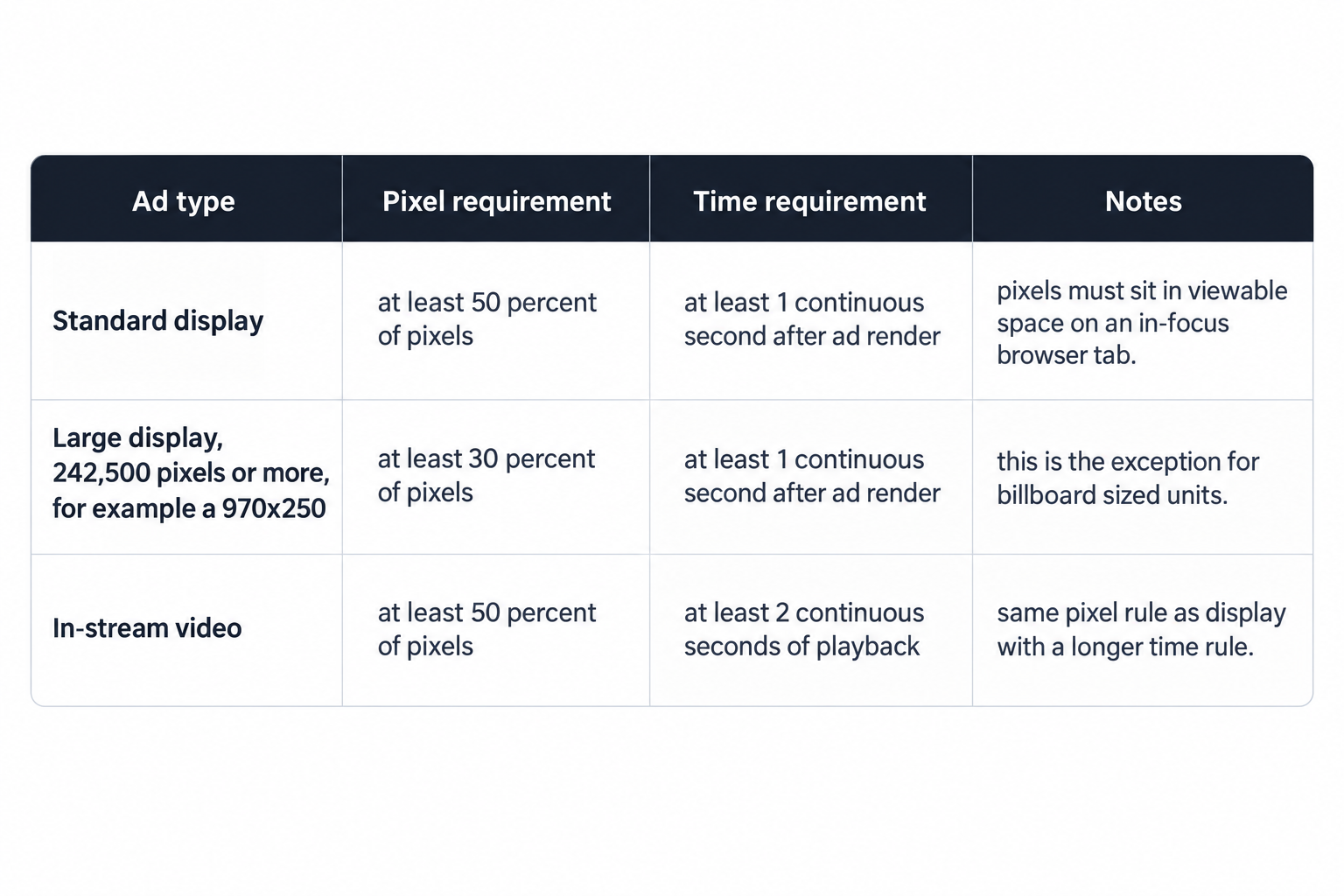
The Media Rating Council sets the bar for display in one sentence of requirements: at least 50 percent of the ad's pixels must sit in viewable space, on an in-focus browser tab, for at least one continuous second after the ad renders. The MRC viewable impression measurement guidelines apply the same pixel rule to in-stream video but demand two continuous seconds of playback. Every fix in this article targets one of the definition's four variables: pixels in view, tab focus, elapsed time, render timing. Learn the thresholds exactly before tuning anything against them.
The guidelines carve out one exception that changes placement math for large formats. Display ads of 242,500 pixels or more, the area of a 970x250 billboard, count as viewable when 30 percent of their pixels hold in view for that same continuous second. A billboard clears the bar at three tenths of its area, which makes it the easiest high impact unit to keep viewable and explains why large formats belong at the top of the page rather than mid article.
Two phrases inside the definition carry operational weight beyond the percentages. In-focus browser tab means an ad that renders in a hidden or background tab accrues no viewable time, so any preload or prefetch logic firing into hidden contexts mints impressions with zero chance to count. After the ad render means the clock starts when the creative paints, not when the reader arrives, so slow pages convert arriving readers into missed impressions.
How Active View turns the standard into a rate
Google operationalizes the standard in Ad Manager through Active View, and the Active View reporting definitions reduce to one formula: viewability percentage equals viewable impressions divided by measurable impressions. The documented example divides 350,000 by 800,000 and reports 43.75 percent. The denominator deserves as much attention as the numerator, because impressions served into environments where the measurement code cannot execute stay out of the measurable pool entirely, and a shrinking measurable count can flatter the rate without any real improvement.
Two habits keep the number honest. Read the rate alongside its raw components per placement, since a site-wide average lets weak slots hide behind strong ones, and placement is where the fixes live. Treat a sudden rate jump paired with a measurable drop as a measurement problem first, not a monetization win, because buyers run their own measurement against the same pages and they see the artifact too.
Run the rate through revenue math and the stakes turn concrete. Take a $6.00 viewable CPM as an illustration: at 70 percent viewability, the effective CPM per served impression works out to $4.20; at 43.75 percent, $2.63. Same demand, same pages, same traffic, and the viewability rate alone costs $1.57 per thousand served impressions. That arithmetic is why the metric belongs on the revenue dashboard, not only in the ad quality queue.
Why 70 percent, and why consistency sells
Buyers who transact on viewable CPMs convert your rate into your clearing price directly: they bid on the viewable impression, so the share they cannot bill comes straight off the inventory's worth. A high average with low variance beats a higher average that swings, because the first can be forecast, packaged into deals and delivered against, while the second forces the buyer to price the bad days. The 70 percent target marks a working threshold of salability: high enough that most impressions clear the bar, stable enough that the number can anchor a deal or a floor.
The path there has a fixed order of impact: where the slot sits, when the ad loads, how fast the page renders, how quickly you catch regressions. Work the levers in that order, because a fast page cannot rescue a placement nobody scrolls to, and no placement survives a wrapper release that ships a render delay.
Placement: the largest single lever
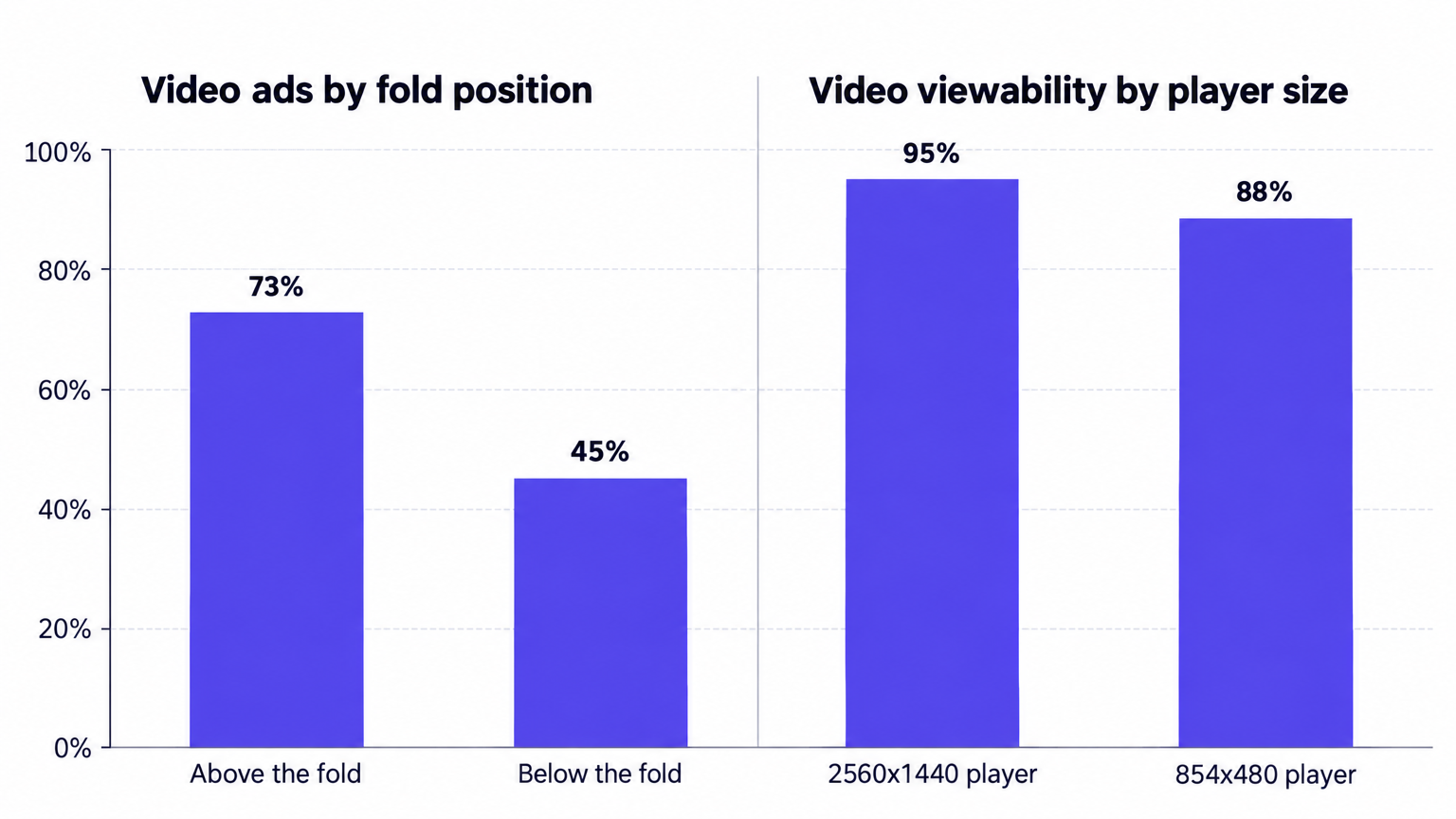
Google publishes benchmarks for exactly this question, and the numbers in Google's viewability best practices mirror what placement-level reporting shows on almost any site above a million pageviews. Video ads above the fold run at 73 percent viewability; below the fold, the same players run at 45 percent. Player size carries its own weight: a 2560x1440 player averages 95 percent viewability while an 854x480 player averages 88, because a player covering a large share of the viewport holds more than half its pixels in viewable space across most scroll positions. Among display formats, vertical sizes such as the 160x600 rank as the most viewable, since the unit keeps pixels on screen through a long stretch of the scroll.
Four placement rules follow from those numbers, and they work as defaults before your own reporting overrides them:
- Keep in-stream video above the fold or in the top band of the first screen, because the 28-point gap between 73 and 45 percent is the widest single swing in the benchmark set.
- Run vertical display units along the reading path, where their geometry earns viewable time during scroll instead of depending on a pause.
- Place standard display at natural stops, subheads, images, paragraph breaks, where readers rest long enough for the one second window to complete.
- Reserve billboards for section tops, where the 30 percent pixel exception does the heavy lifting.
Apply the four as template defaults, then let placement-level reporting override them where your layout genuinely differs, because a long-form template and a news template reward different geometry.
Lazy loading: one technique, two outcomes
Proper lazy loading loads pages faster, reduces latency and CPU consumption, and can raise the overall viewability percentage, according to the same Google guidance. Improper lazy loading does the opposite and corrupts reporting on top of it. The difference reduces to two rules: request the ad as the slot approaches the viewport, and leave rendered slots alone.
Google names the anti-pattern explicitly: hiding previously rendered slots as the user scrolls is not proper implementation. Hiding a slot after render breaks the pixel and timing geometry that measurement depends on, and it strands the impression between served and seen. On tooling, Google recommends Google Publisher Tag for lazy loading because other implementations can fire ad requests that never render a creative. That failure mode costs twice: you burn an auction round trip, and nothing sellable comes back.
Refresh extends the same discipline. Each refresh gives a new creative its own render and its own shot at the viewable window, but a refresh that fires while the slot sits off screen manufactures impressions with no chance to count. Fire refresh only while the slot remains in view, and give each creative enough dwell to earn its viewable second, or its two seconds for video, before replacement. A cadence tuned to the viewable window raises viewable impressions per page; a cadence tuned to raw impression count raises only the denominator.
Set the lazy load margin deliberately as well. A generous margin requests and renders ads well before arrival, which inflates the served count and lets creatives time out; a zero margin requests too late, so the reader passes the slot while the auction still runs. Measure the margin per template, because a long-form article and a short news page scroll at different speeds.
Page speed and the render clock
The continuous second starts after render, so the gap between the reader reaching a slot and the creative painting decides most of that slot's fate. Slow pages lose twice: the reader scrolls past before the ad paints, and heavy CPU load on low power devices delays painting even after the creative arrives. In Prebid, cap the auction timeout and keep the wrapper to bidders that clear a revenue contribution bar, because every additional participant adds milliseconds that land between arrival and render. Defer non-ad scripts, and audit third party tags on article templates, since one heavy tag on a template depresses viewability across every page that template renders.
Watch occlusion in the same review. Pixels covered by a sticky header, a cookie banner or a floating widget do not sit in viewable space, so slots placed directly under persistent UI lose measurable area before the reader even moves. Drop such slots below the fixed UI's maximum height, then recheck their rate.
Video and the two-second rule
In-stream video inherits the display pixel rule but must hold it for two continuous seconds of playback, which changes what a placement must deliver: not just entry into view, but dwell. Out-stream units sit between paragraphs, and a muted player that starts and gets scrolled past inside two seconds produces video impressions with almost no chance to count. Anchor out-stream at reading stops, start playback on viewport entry with sound off, and protect the first two seconds before any collapse behavior runs.
Interstitial video on mobile flips the problem: a full screen container holds all pixels, so the pixel test clears trivially, and the work moves to frequency and intrusiveness. Format selection is where you settle these tradeoffs in advance: the full set of IAB display and video formats, every IAB display size plus in-stream, out-stream, interstitial and CTV video, lets you match format to placement deliberately instead of by default.
Selling against the metric: vCPM line items
Ad Manager includes a serving option built for viewable pricing: the vCPM line item, which limits serving to predicted viewable inventory. The feature predicts which inventory will be viewable using the line item's targeting and historic network viewability, then stops serving at the entered impression cap even if the viewable CPM goal goes unmet, and it may under-deliver in exchange for less impression waste. Accept that trade with open eyes: a buyer paying a viewable CPM buys viewable impressions, not attempts, and the line item enforces the difference mechanically. Under-delivery is the price of the guarantee, and it usually costs less than serving impressions the buyer cannot bill.
Use the same logic in deal conversations. A placement holding 70 percent supports a viewable CPM discussion; the same placement at 45 percent does not, regardless of what the site average says, which is one more reason the per-placement number has to leave the ad ops spreadsheet and reach the sales team.
Start with a 48-hour audit
Before changing a single template, spend two days establishing where the inventory stands. Pull Active View numbers per placement, then sort the list two ways: by served impressions, to see where the money is, and by viewability rate, to see where the waste is. Cross reference the measurable rate in the same view, because a slot with weak measurability has an environment problem, not a placement problem, and the fixes differ.
The sort lands every slot in one of three buckets, and each bucket gets a different response:
- Slots above 70 percent with real volume: replicate them. Find their common traits, position, format, loading trigger, and apply those traits to weaker slots.
- Slots between 50 and 70 percent: fix in place, usually by moving the unit relative to content stops or adjusting the lazy load margin.
- Slots below 50 percent: remove or rebuild. Low rates on meaningful volume drag the site average and the clearing price more than any strong slot lifts them.
Two days of sorting turns a vague site-wide problem into a slot-by-slot worklist, and the worklist is what actually moves the average.
The loop that keeps the number
Levers drift, so install a loop that catches regressions before buyers do. Template changes, wrapper releases and new partner tags all move viewability, and the movement shows per slot, not per site. The cadence we run: a weekly placement-level review in Active View, a same-day check on any slot that moves more than a few points, and alerts tied to both viewable and measurable counts. Our ten minute reporting console refreshes every metric on that schedule with API access, because a regression introduced by a release needs to surface within the hour, not at month end. Agencies advising publishers should ask for slot-level viewability in every report they receive, and treat a site-wide average on its own as a red flag, because averages let bad slots hide.
Where the demand side meets the same measurement
Viewability work compounds when demand prices the inventory the same way you measure it. We are OnlyMedia, an ad network, an SSP and an agency in one company: we integrate OpenRTB 2.6 seats and Prebid for header and server-side demand, and we work with thousands of publishers, each above one million monthly pageviews, so the placement, lazy loading and latency guidance above describes the stack we operate, not theory. We pay Net 30, CPM based, no chasing, no sliding terms, and the demand behind those payments runs through our curated programmatic demand network. If you want the structure in one place, the publisher monetization page covers curated demand, the reporting console and Net 30 payments. Bring a placement-level viewability report to any partner conversation, ours or anyone else's, and let the per-slot numbers carry the negotiation.