The Modern Ad Ops Tech Stack: Must-Have Tools for the Digital Publisher

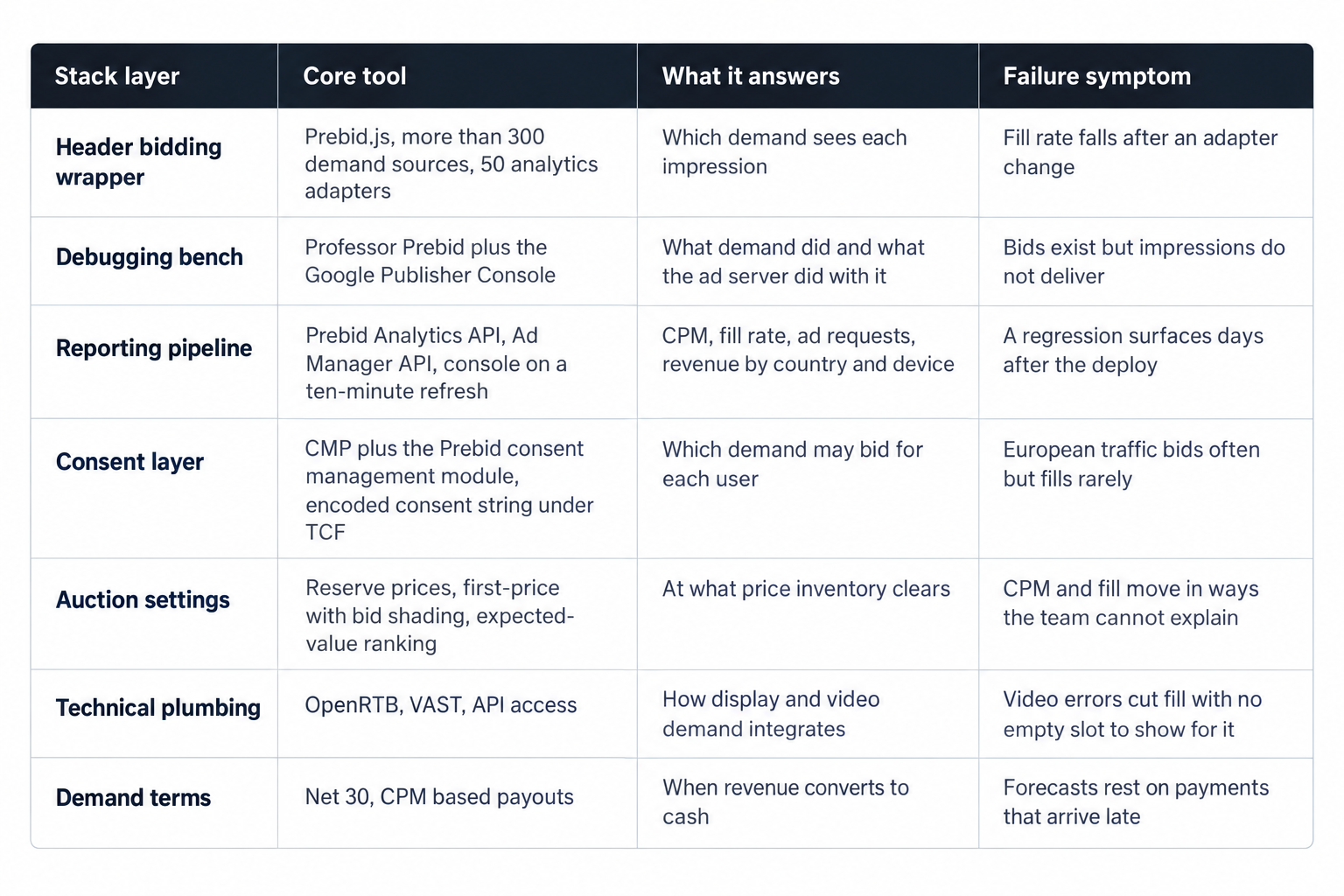
Prebid.js ships with integrations for more than 300 demand sources and 50 analytics adapters, and no publisher above one million monthly pageviews should run more than a fraction of either. The stack that pays is small, layered and measurable: a header bidding wrapper, a debugging bench, a reporting pipeline, a consent layer, auction settings, technical plumbing, and a demand partner with terms you can model. Across the thousands of publishers we work with, the steadiest operations share one habit: they measure every tool they install, then keep measuring it. Each layer below gets the same treatment: what it does, which open-source or platform tool runs it, and what breaks when it goes unattended.
The wrapper: Prebid.js and demand selection
The wrapper decides which demand sees each impression and how much latency the page pays for that access, so every number downstream depends on it. Prebid.js is the reference implementation of the job: a header bidding platform with integrations for more than 300 demand sources and 50 analytics adapters. Treat those counts as a menu, not a target. Every adapter you enable ships code to the page, joins every auction and adds a maintenance obligation, so the question for each candidate is what unique demand it brings.
Selection discipline separates a working stack from a crowded one. Enable each new demand source through a holdout test: run it on a share of traffic against a control, compare revenue per session, and cut it if the net effect rounds to zero. Watch for overlap, because several adapters often reach the same buyers through different paths, and the sixth of them raises auction load without raising clearing prices. Win rate tells you little on its own; a partner that bids often and wins cheap fills your logs while it drags your averages down. Judge adapters on net revenue, write down why each one earned its place, and rejudge the whole set every quarter.
Engineering hygiene keeps the wrapper honest. Pin the Prebid.js version, keep the configuration in version control, and deploy changes with a review and a rollback path, the same discipline you apply to application code. The modular design loads only what you use: the bid adapters you tested, the consent management module, the analytics adapters, nothing else. Set the wrapper timeout against your own page speed budget rather than a copied default, because a bid that arrives after the ad server request has gone out earns nothing. If page latency starts to crowd out viewability, the first lever is fewer, better demand sources, not more of them.
Slot discipline rounds out wrapper work. Lazy loading changes auction timing: a slot that enters the viewport late still needs its bids to arrive before the ad server call, so confirm the wrapper fires per slot rather than once per page. On long pages, re-check the timeout on slots far down the document, where rendering work piles up. Keep the slot map inside code review too, because a template refresh that changes a container can quietly change what the ad server delivers.
The debugging bench: Professor Prebid and the Google Publisher Console
Every stack change, a floor adjustment, an adapter swap, a slot resize, deserves a before-and-after pass on a real page. Regressions hide in details that dashboards only hint at: a targeting keyword that stopped passing, a bidder whose responses slowed, a slot that renders but never fills. Two free tools cover most of the bench work.
Professor Prebid is an open source Chrome browser extension for debugging and troubleshooting Prebid.js pages. It shows the auction as it ran: bid values, currencies, response times, ad server targeting keywords, and a detailed auction timeline. Walk your templates with it after every wrapper deploy. Compare response times across bidders on the same page, check the ad server targeting keywords each bid produced, and find the adapter that bids reliably but never wins, or wins below your floors. The timeline also shows which bidders answered late and which auctions ran long.
The Google Publisher Console covers the other half of the bench. It inspects ad delivery on pages using GPT, adds an overlay to every registered ad slot, and opens through googletag.openConsole(), the ?google_console=1 URL parameter, or Ctrl+F10. Its Ad Slots, Page Request and Configuration tabs split the problem three ways: slot delivery, the page request, and the tag configuration. When bids exist in the wrapper but impressions do not deliver, the break sits between the two systems: a key-value mismatch, a missing line item, a targeting rule that excludes the page.
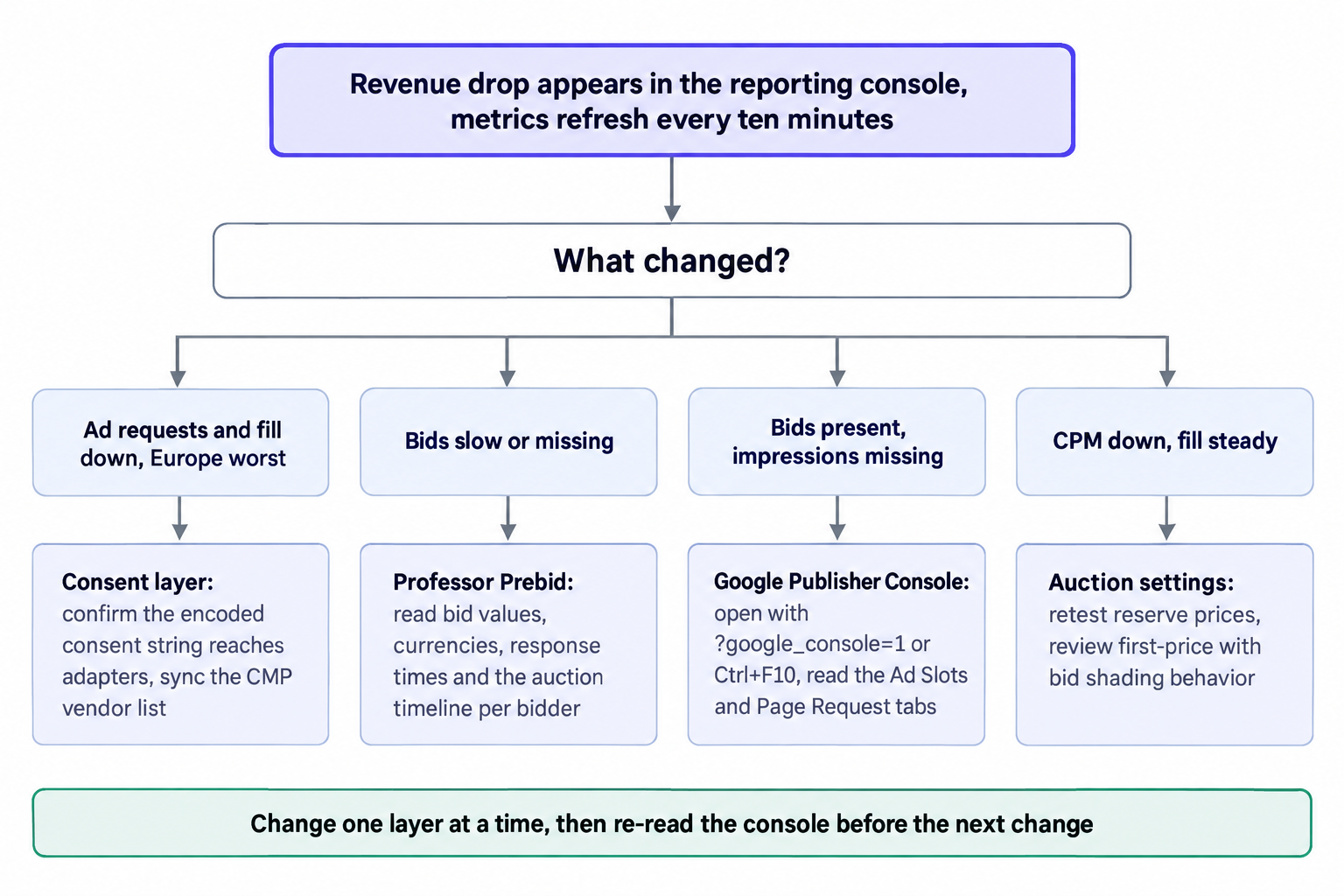
A worked example makes the pairing concrete. After a template refresh, revenue dips. The console shows fill steady but CPM soft on one device class, so the fault sits in demand, not delivery. Professor Prebid then shows one bidder answering late on the new template, and the fix is to shorten that adapter's timeout for the format or drop it there. Ten minutes of bench work replaces a week of guessing at dashboards. Write the triage order into your runbook so that whoever notices the dip first reaches for the right tool.
The reporting pipeline: a ten-minute console and two APIs
Cadence decides what a regression costs. A daily report finds a fill-rate drop two days late; a ten-minute cycle finds it while the deploy is still fresh. The OnlyMedia reporting console refreshes every metric every ten minutes: CPM, fill rate, ad requests, pageviews, revenue, countries, devices and video detail, with API access for every figure on screen. A floor change shipped in the morning shows its effect on revenue and fill before lunch, which is the difference between a tuning loop and a quarterly guess.
Programmatic reporting removes the spreadsheet from the loop. The Ad Manager API runs and downloads reports programmatically, using saved report queries or ad hoc ReportQuery objects, and the CSV_DUMP format exists for machine processing. Keep saved report queries for the standing numbers, revenue by line item, impressions by country and device, and build ad hoc ReportQuery objects for triage, the impression dip in one geo on one format yesterday. Land the CSV_DUMP output in your warehouse and let scheduled queries, not a person pasting numbers, catch the anomalies.
The wrapper side needs its own pipe. The Prebid Analytics API provides a way to get analytics data from Prebid.js and send it to the analytics provider of the publisher's choice, which keeps the bid stream under your control when you swap demand sources. Choose one or two of the 50 analytics adapters rather than several, since each one ships code to every page, and point them at a destination your team actually opens. Bid-level history is what makes holdout tests, floor experiments and adapter pruning defensible months later.
Reconcile three numbers on a schedule: ad requests at the wrapper, impressions at the ad server, paid impressions in billing. The gaps diagnose. Requests without impressions point to timeouts, consent drops or unfilled slots; impressions without revenue point to creative or billing faults. Watch the slices, fill rate by country, CPM by device, ad requests per pageview, because a problem concentrated in one market hides inside a healthy global average. When a gap widens week over week, take it to the debugging bench before you touch floors or adapters.
The consent layer: a CMP, the TCF and the module that connects them
Consent is a revenue surface, not a paperwork exercise. Prebid's consent management module supports GDPR by working with supported consent management platforms to fetch an encoded consent string, and IAB Tech Lab stewards the TCF technical specifications that define what that string carries and how systems read it. Configure this layer with the same care you give floors, because buyers treat a missing or malformed string as a signal to stop bidding, not as noise.
The failure modes stay quiet. A consent string that never reaches the bid adapters makes demand drop out of European traffic without an error message, a CMP vendor list out of sync with your adapters invalidates the string silently, and a CMP update can change how purposes propagate. The symptom pattern is distinctive: strong ad request counts, weak fill and soft CPMs concentrated in the regions where the consent framework applies.
Test consent the way you test creative. Confirm the CMP fires before the wrapper runs, so auctions start with consent in hand. Verify the encoded consent string on live pages, check that every demand source you run appears on your CMP's vendor list, and retest after each CMP update and each new adapter, because a new adapter may require purposes your CMP does not yet surface. Keep consent metrics next to fill rate in the same console view so the correlation shows at a glance.
Auction settings: first-price, bid shading and reserve prices
The wrapper and the ad server implement an auction your team should reason about, not just watch. Under first-price with bid shading, buyers bid below their true value to avoid overpaying, so a naive read of the bid distribution misprices inventory. Expected-value ranking, which scores demand by the revenue it actually returns rather than the bid it claims, keeps the pecking order honest. We publish our auction mechanics and bid shading rules in full, including expected-value ranking and reserve prices, so partners can model a change before it ships.
Reserve prices move CPM and fill in opposite directions, so treat every floor as an experiment rather than a setting. Change one floor at a time, hold a control, and read revenue and fill in the same reporting window, at ten-minute granularity for the first hours and daily after that. When you raise a floor, shaded bids respond unevenly: some buyers re-shade down, others walk, and the net effect on revenue depends on your demand mix, which is why the experiment decides, not the theory. Floors per placement, per country and per device beat a single sitewide number, because clearing prices differ by format, geo and device. Revisit the floor set quarterly; a floor that made sense when a layout launched can be wrong after a redesign.
Technical plumbing: OpenRTB, VAST and API access
Two open standards carry most stack traffic: OpenRTB for display and in-app auctions, VAST for video. Integration quality shows up in video first, because a VAST tag that errors kills fill without a visible slot failure, and the loss lands in error counts rather than empty boxes. Validate every new video setup before rollout, then watch error counts per placement rather than per site. Video detail in the reporting console tells you which placements deserve the validation pass first.
Wire against the specification, not against folklore. Our OpenRTB and VAST documentation spells out the integration surface your engineers need: request and response fields, error handling, and the sequences a correct implementation follows. Teams that implement against the documented contract catch regressions in staging; teams that guess catch them in revenue. Keep one engineer accountable for the integration, version the tag templates like any other code, and keep a standing test page per format, display, in-feed, out-stream, that you revalidate whenever the wrapper or the ad server configuration changes.
The demand layer: terms, transparency and payout cadence
The last layer is commercial: who buys the inventory, under which auction rules, and when the money lands. Payment terms belong in a stack evaluation next to fill rate and CPM, because a CPM that clears in thirty days funds a different operation than the same CPM clearing in a hundred and twenty. A stack that measures everything but models cash on a guess has a blind spot exactly where payroll lives.
At OnlyMedia we run an ad network, an SSP and an agency in one company, and we pay publishers Net 30, CPM based, no chasing, no sliding terms. Our curated programmatic demand network works with publishers above one million monthly pageviews, so the acceptance threshold and the payment terms sit in one place. We hold ourselves to the standard this article describes: publish the auction rules, expose the reporting, keep the payout cadence fixed.
Whatever you evaluate, demand the same three things from any partner: auction rules you can model, reporting you can pull on your own schedule, and a payout cadence you can plan against. Evaluate partners with the same holdout discipline you apply to adapters, and compare their numbers against your own console, slice by country and device, before you trust them. Agencies advising publishers can turn this article into an audit script: score each layer, note the missing tools, and attach numbers from the publisher's own reporting before recommending anything.
The review cadence
A stack decays on a schedule, so put its maintenance on one too. Auction dynamics drift, adapters go quiet, CMPs update, and redesigns break slot IDs that used to deliver. A quarterly pass, in this order, catches most of it:
- Wrapper: update Prebid.js, prune adapters that stopped bidding, rerun holdout tests on the survivors.
- Debugging: walk the highest-revenue templates with Professor Prebid and the Google Publisher Console.
- Reporting: confirm the APIs still land data and the console still matches the ad server.
- Consent: verify the encoded consent string on live pages and sync the CMP vendor list with your adapters.
- Auction: retest reserve prices per placement, country and device against the quarter's revenue and fill.
- Plumbing and terms: revalidate the VAST setups and restate the payout terms in the cash plan.
Between reviews, watch the console daily; the ten-minute refresh does the early warning. Most tools on this list are open source or part of platforms you already run, which removes the budget excuse. What most teams lack is the schedule: book the quarterly review, name an owner for each layer, and the stack holds its numbers instead of quietly giving them back.