Optimizing Your Header Bidding Wrapper for Google's Core Web Vitals

On March 12, 2024, INP replaced FID as a Core Web Vital, and every tap, click and keystroke on a page that runs a header bidding wrapper has counted toward that score since. A wrapper touches all three vitals at once: its script placement sits near the Largest Contentful Paint path, its unsized slot containers generate Cumulative Layout Shift, and its auction and rendering callbacks compete with user input for main thread time. The scoring change widened the blast radius. FID measured only the first interaction on a page; INP reflects the worst of a visit's interactions, so a wrapper that stutters when a refresh timer fires mid-scroll now fails pages that passed the old test.
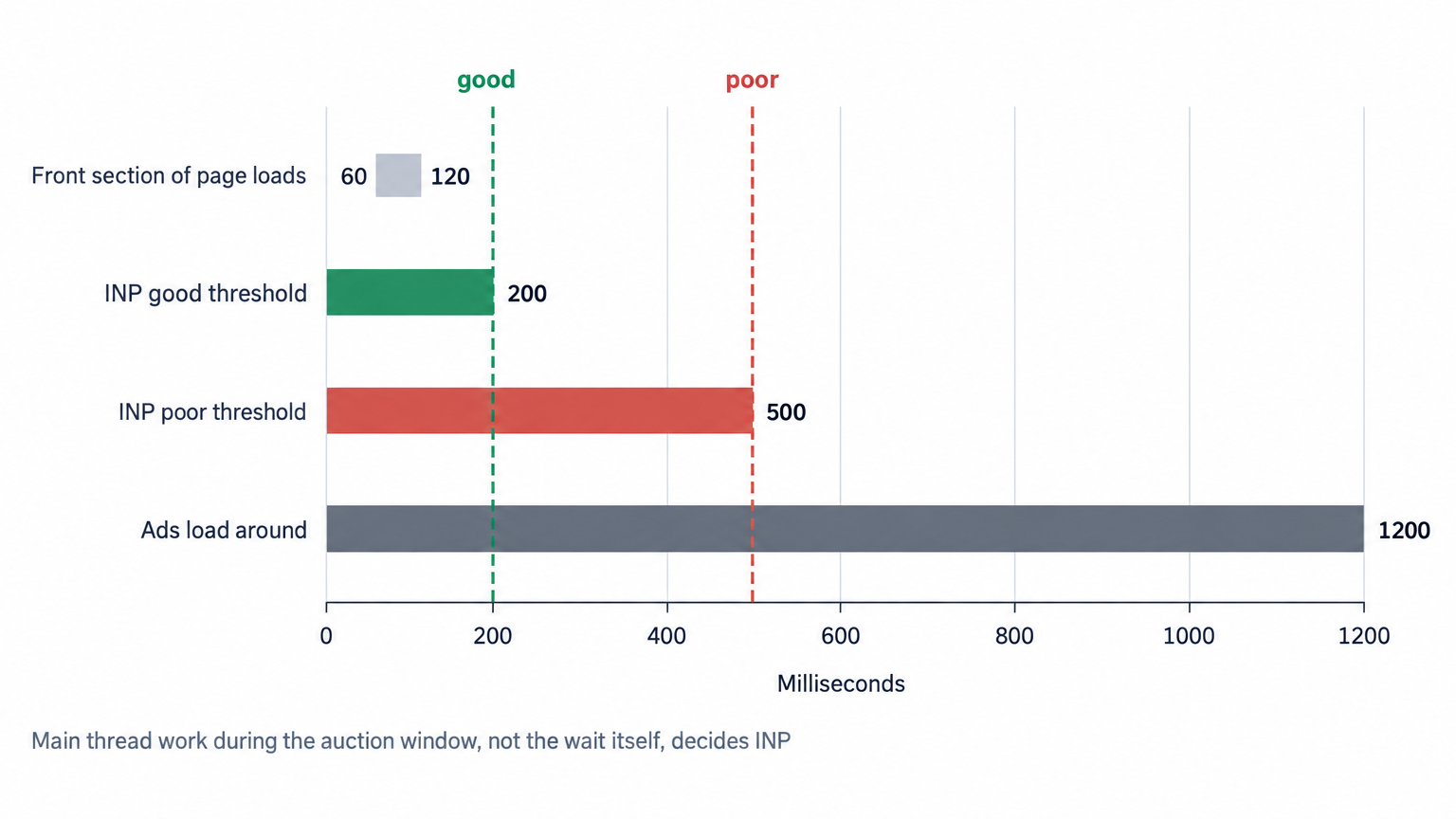
Chrome counts INP good at or below 200 milliseconds and poor above 500 milliseconds. Most wrapper-related risk lives between those thresholds, in the milliseconds that bid parsing, slot rendering and refresh logic spend on the main thread while a user tries to read or interact. At OnlyMedia we run header and server-side demand for thousands of publishers, each above one million monthly pageviews, integrating OpenRTB 2.6 seats and Prebid, and wrapper tuning is the first change we make when a publisher's field data turns red.
The tension here is operational, not technical. Vitals score at the 75th percentile of visits, revenue accrues per impression, and a change that improves field data for most visits can still cost money if it empties a placement on the rest. Every fix below therefore comes with the measurement that proves it paid, and the ones that cannot prove it stay out of the wrapper.
Where the wrapper touches each vital
Cumulative Layout Shift begins at the slot container
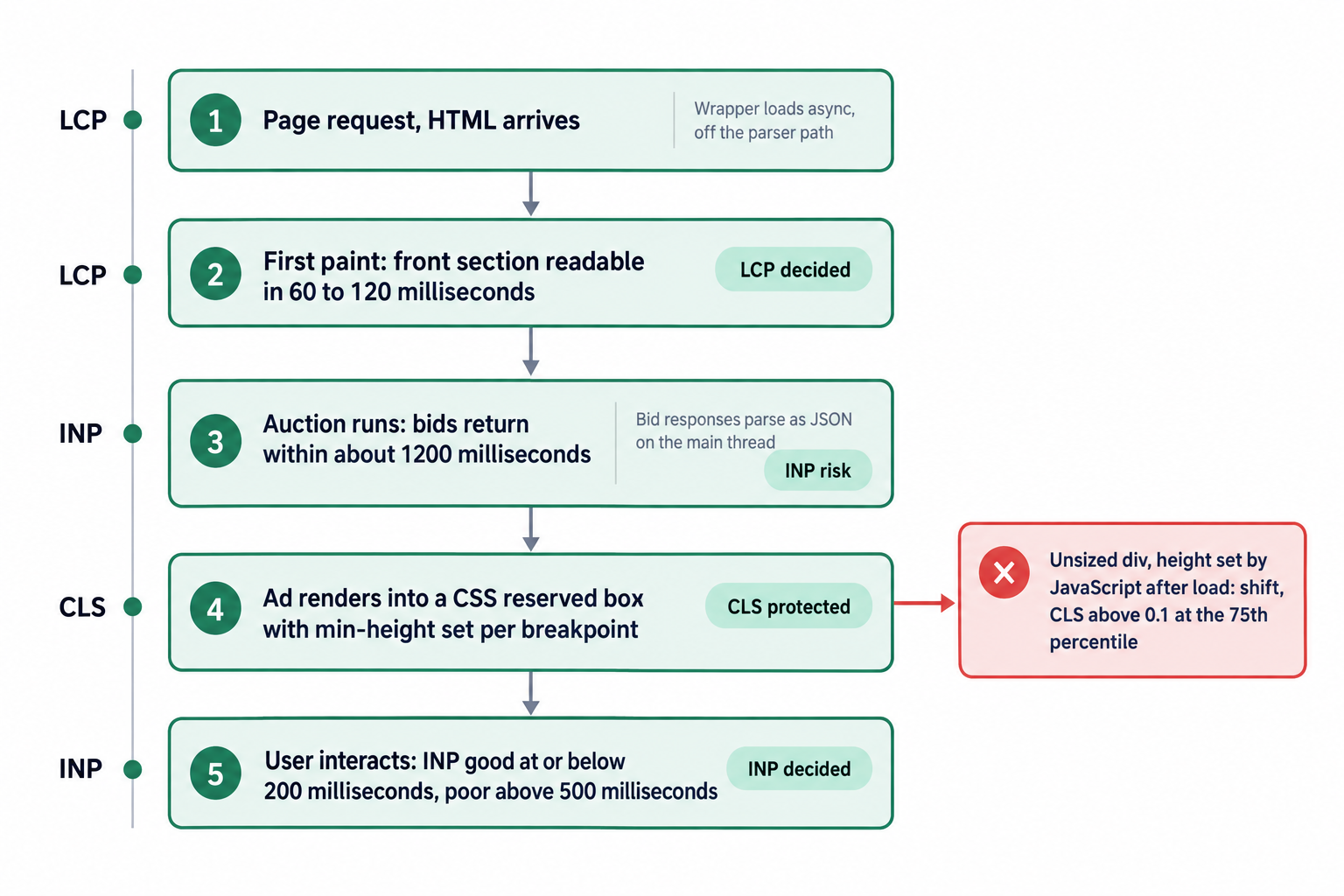
Ads are one of the largest contributors to layout shifts on the web, and the shifts that come from late-loading content go away the moment you reserve the space, as web.dev's guide to diagnosing and fixing CLS documents. The Core Web Vitals standard rates CLS good when the 75th percentile of visits stays under 0.1, and an ad placement spends that budget faster than anything else on a page: one creative that renders into an unsized div and shoves article text downward can consume the entire allowance in a single paint.
The fix is blunt in Google's documentation. The only guaranteed way to avoid ad slot layout shift is reserving sufficient space with CSS, and you should avoid reserving space with JavaScript, because the script load itself can shift layout, as the official Publisher Tag guidance on how to minimize ad slot layout shift states. Implementation therefore belongs in the stylesheet, not the tag. Give every slot container a min-height, set per breakpoint to match the tallest creative your size map requests there, and keep your Google Ad Manager size mappings aligned with those breakpoints so the ad server never serves a creative taller than its box. An aspect-ratio container handles responsive layouts where width varies.
Three placement decisions decide most of the outcome. Multi-size slots: if a placement accepts both a 300 x 250 and a 300 x 600 at one breakpoint, reserve the taller height unless your win data proves the short size dominates, because the first tall creative that wins moves everything below it; where the data supports it, split the placement instead. Anchors: in-content slots belong at fixed paragraph boundaries, since a slot injected at an unpredictable offset shifts text in both directions. Collapse policy: an unfilled slot that collapses a second after the article rendered creates exactly the shift you reserved space to prevent, so hold the reserved box and accept the whitespace, backfill with a house or direct creative, or restrict collapse to below-the-fold slots, where the empty box disappears before the user scrolls into it.
Verify the fix in the browser before you ship it. Chrome DevTools exposes a Layout Shift Regions overlay: enable it in the rendering panel, reload the page, and every region that moves draws a highlighted box at the moment it moves. An ad slot that flashes on load tells you which container still lacks a reserved height, before field data spends weeks confirming it.
The auction window does not starve your content
Prebid's own testing found that neither the number of bidders nor the wait length really moves page content load time: the front section of a page loads in 60 to 120 milliseconds, while ads load around 1200 milliseconds, because most bids return within that window. Two operational consequences follow. First, cutting your bidder timeout far below the point where bids return trades real revenue for a content-speed gain the user will never perceive. Second, when your Largest Contentful Paint element is a hero image or a headline, the auction is not what delays it: a synchronous wrapper in the head blocks the parser, and an LCP resource that only JavaScript can discover delays the paint on its own.
Protect the paint path directly. Load the wrapper asynchronously, keep the LCP element in the initial HTML with explicit dimensions, and never gate a hero image behind the auction or the consent flow. Before touching the timeout, pull the distribution of bid arrival times from your wrapper analytics across a representative week, and set the timeout just past the point where arrivals flatten, not at a round number: demand that answers after the knee contributes almost no wins, while demand that answers before it funds the page. The global setting then becomes a floor, and per-adapter overrides do the fine tuning.
Interaction to Next Paint lives on the main thread
The 200 millisecond good threshold is generous for a text page and tight for a page that runs an auction in the browser. Every bid response parses as JSON on the main thread, the ad server request assembles there, and creative rendering, refresh timers, consent callbacks and win-notification pixels all queue on the same thread that must answer a user's input. When that work runs beside an interaction, the interaction inherits the delay, and INP keeps a near-worst sample of the visit.
The countermeasures are scheduling decisions:
- Load the wrapper after first paint. Content lands in 60 to 120 milliseconds and ads land around 1200 milliseconds regardless, so delaying the auction start changes when the first ad appears, not when the user can read.
- Break bid processing into small tasks and yield between adapters, so no single auction step monopolizes the thread.
- Keep interaction handlers lean. Demand calls, audience enrichment and consent re-checks belong outside click and tap handlers.
- Count every input type. INP samples taps, clicks and keypresses alike, so a search box that stutters while a refresh timer fires scores as readily as a sluggish menu.
- Lazy load below-the-fold slots with IntersectionObserver, into boxes the CSS already sized, so rendering happens out of view and into stable containers.
- Treat refresh as the highest-risk feature you ship. Each refresh re-runs the auction, re-parses responses and re-renders a creative while the user is present. Refresh only slots in view, throttle the interval, and pause the cycle while the user scrolls or types.
Out-stream video warrants separate scrutiny on both vitals: a player injected into an unsized container shifts more layout than any display slot, and VAST parsing adds main thread work on top of the render. Diagnose before you refactor. The DevTools performance panel marks long tasks and attributes each one to the script that caused it, so when an adapter script owns a long task that overlaps a click, you know which partner to confront or cut.
Load order, consent and render bursts
Three configuration patterns decide whether wrapper work collides with the user, and none of them live in a timeout setting. All three live in how the page loads and renders.
- Consent: load the consent platform before the wrapper, because bid requests need the consent string, but never let content wait on it. The article paints regardless of consent state; only the ad call holds. A wrapper that defers first paint behind a dialog the user has not answered hands LCP failures to the consent script.
- Render bursts: single request architecture in Google Ad Manager batches the ad server call for every slot into one, and the creatives render in a burst once it returns. That burst is a long task that lands wherever the user happens to be interacting. Reserved boxes absorb the shift, but the thread cost remains, so prefer distributed rendering on long article pages, or lazy load so the burst never happens in view.
- Scroll handlers: a scroll listener that reads slot offsets with getBoundingClientRect on every event, to drive lazy loads or refreshes, forces layout recalculation at scroll frequency. Read offsets once, cache them, and hand viewport decisions to IntersectionObserver, which schedules work between frames.
None of these patterns appears in an adapter list or a timeout value, which is why wrapper audits that stop at the configuration file miss them.
Adapter count is a cost line, not a badge
Every adapter you ship charges three costs: script weight the browser must download and execute before the first bid request, parse time for every response it returns, and an auction latency floor set by its slowest responding partner. The winner list matters more than the partner list. Audit each adapter on win rate, average CPM and time-to-bid on a rolling basis, and cut partners that lose on all three axes: they never win, they answer late, and they still occupy the main thread on every request.
This is where curation pays. A wrapper with a dozen seats that win earns more than a wrapper with forty seats that merely parse, and we filter the seats we route into a publisher's auction for exactly that reason. A fast reporting cadence flags a partner that went quiet before it costs a week of revenue.
Consolidate demand server-side where it pays
A server-side connection adds a network hop between the wrapper and demand, and that hop costs milliseconds. Consolidation pays when one connection replaces a stack of client adapters: fewer scripts at load, fewer responses parsed on the main thread, one auction to monitor instead of twelve. We integrate OpenRTB 2.6 seats and Prebid for header and server-side demand, and our SSP runs one unified auction per impression with AdX via MCM, Prebid adapters and managed floors, which keeps the browser's job thin while the demand roster stays wide. Consolidation removes code, not latency discipline: the same per-adapter time-to-bid audit applies on the server side, because demand that returns late behind a hop still returns late.
Measure vitals and revenue in the same window
Field data decides; lab data diagnoses. The Chrome UX Report gives the 75th percentile per metric across real visits, Search Console groups failing pages into sets you can map to templates, and the DevTools performance panel names the specific long task and the specific script behind a bad sample. Pair every vitals reading with revenue, because space reservation and adapter cuts move viewability, fill and CPM in different directions. Our delivery stats refreshed every ten minutes cover CPM, fill rate, ad requests, pageviews, revenue, countries, devices and video detail, with API access, so a template test shows both curves together, and the API lets you pull delivery into the same dashboard as your field data and alert on fill rate after every wrapper release.
Score the 75th percentile, not the average. Averages hide the tail that Chrome actually grades, and a wrapper can average well while the slowest quarter of visits fails. Percentile discipline also matches how Search Console reports the data, so the number you optimize is the number that gets graded.
Change one variable per release. Raising slot heights, deferring the wrapper and cutting adapters all touch the auction, and a bundled release tells you nothing about which change paid. Compare revenue per pageview rather than CPM alone; the pageview denominator keeps the comparison honest when reserved boxes change how many impressions render per visit.
What to demand from demand partners
For a publisher above one million monthly pageviews, or the agency advising one, partner selection is wrapper optimization by other means. Ask three questions of every demand partner. First, payment terms: we pay publishers Net 30, CPM based, no chasing, no sliding terms, and any partner worth a slot in your wrapper can state the same in numbers. Second, curation: a curated programmatic demand network with seats that win beats an adapter roster that merely exists, and we filter what we route accordingly. Third, reporting: our publisher monetization terms sit beside the ten minute console and Net 30 payments on the same page, because a partner you cannot measure within an hour is a partner you cannot tune. OnlyMedia works all three sides of this trade, as an ad network, an SSP and an agency, and we apply the same three questions to our own roster.
Agencies should put the three questions in the RFP template. Payment terms, curation policy and reporting cadence separate partners who operate inventory from partners who resell access to it, and the wrapper inherits the difference in script weight and parse time.
The audit sequence, in order
Run these steps in sequence, because each one changes how the next one measures. Resist the urge to batch them into one release.
- Pull field data per template and identify which vital fails where, then use lab tools to find the specific task.
- Add CSS min-height to every slot container, per breakpoint, matched to your size maps.
- Delete any JavaScript that sets slot heights after load.
- Fix the collapse policy: hold or backfill above the fold, collapse below it before the user arrives.
- Set the bidder timeout to where your demand actually returns, then audit per-adapter time-to-bid, win rate and CPM.
- Cut adapters that lose on all three axes.
- Load the wrapper after first paint and keep the LCP element static in the initial HTML.
- Lazy load below-the-fold slots into boxes the CSS already sized.
- Impose refresh discipline: in-view only, throttled, paused during active interaction.
- Move long-tail demand behind one server-side auction and keep the wrapper thin.
- Read revenue per pageview beside the 75th percentile vitals after every step.
None of this trades revenue for speed. The two highest-yield fixes, CSS space reservation and adapter cuts, protect the vitals and the auction at the same time, and the rest is scheduling. A wrapper holds three jobs: stay off the paint path, stay off the interaction path, and render into boxes that already have their size. Do those three things and the March 2024 scoring change turns from a standing threat into a line item you verify at each release, beside fill rate and revenue per pageview.