Monetizing Mobile Web Traffic: Interstitials, Anchors, and Sticky Ads

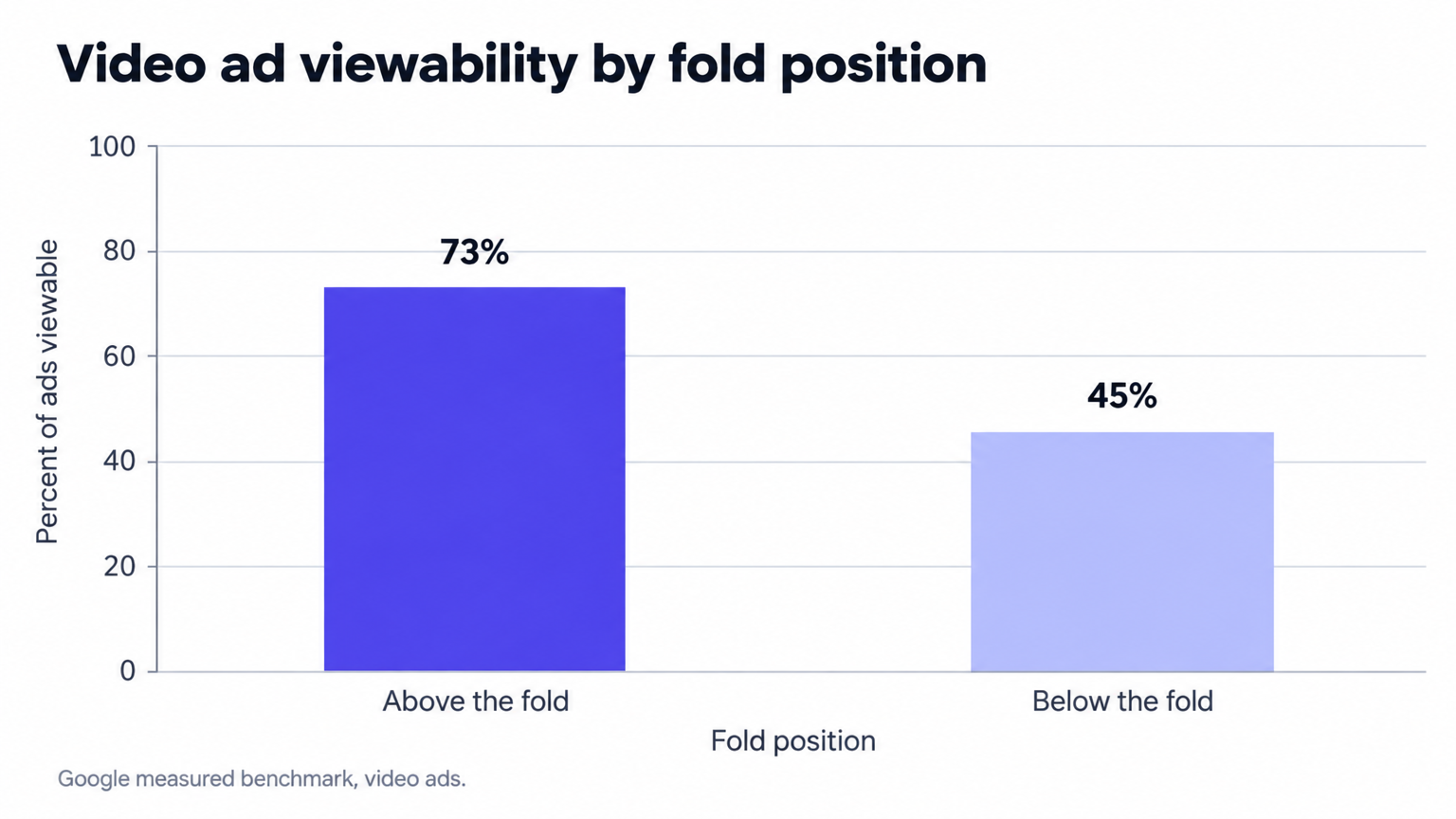
Google's measured benchmark puts 73 percent of above-the-fold video ads in view, against 45 percent below the fold. That gap drives every format decision on mobile web: the further a slot sits down the page, the fewer sessions ever deliver it fully in view. An anchor ad attacks that geometry directly by pinning a banner to the viewport, so scroll position stops deciding whether an impression counts. A web interstitial monetizes a moment display inventory never touches, the transition between two pages. Both formats create inventory that did not exist before, and both sit next to compliance lines that cost churn and search visibility when crossed.
What each format actually is
Sales decks use interstitial, anchor and sticky interchangeably. Ad operations should not, because each format occupies a different point in the page lifecycle, and the standards treat the three differently.
Google defines the web interstitial as a full-page ad that monetizes page transitions, an inventory and revenue source that exists beyond display banners. The trigger is navigation: the reader taps from one article to the next, and the interstitial occupies the viewport during the transition before the destination page renders. Google traffics web interstitials as their own format in Ad Manager rather than as display banners, and the documentation on trafficking web interstitials in Ad Manager covers the setup from line item to delivery.
An anchor ad remains in view as the user scrolls, and the reader can dismiss it at any time through a close control. Google's documentation on anchor ads on the web defines three placements: top of page, bottom of page, and desktop side rails. The anchor is the productized, compliant version of viewport pinning: a small documented footprint, a persistent close control, and a position offset from content rather than laid over it.
Sticky describes a behavior, not a product. Any unit pinned to the viewport across scroll qualifies, which makes an anchor a sticky ad with guardrails. A unit pinned through a home-built fixed-position wrapper carries none, and large sticky ads sit on the Better Ads Standards prohibited list for mobile web. The vocabulary difference carries revenue consequences, not just semantic ones.
The sizes that actually trade
Google's anchor documentation fixes the reservation sizes by device, and open demand builds creatives against exactly these numbers. Anything outside the documented set needs custom deals rather than marketplace expectations:
- Mobile web: 320x50 and 320x100
- Tablet: 728x90
- Desktop, top and bottom of page: 728x90, 970x90, 980x90 and 990x90
- Desktop side rails: 120x600, 160x600 and 180x500, positioned 5 to 25 pixels from main content
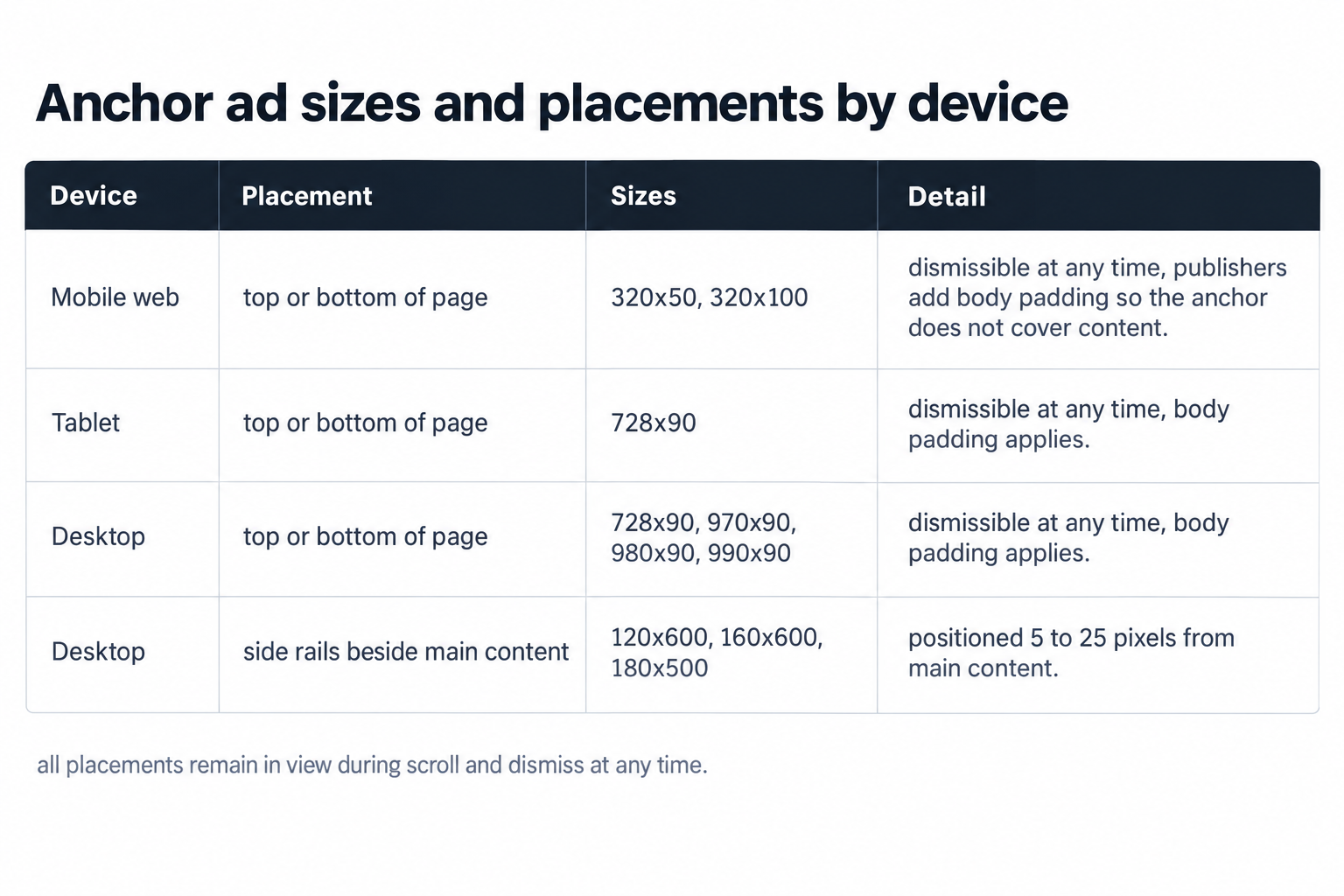
Run 320x50 and 320x100 in one mobile placement rather than two. The 320x100 creative gives buyers a taller canvas in the same anchored slot, and a multi-size declaration lets both sizes compete in a single auction instead of splitting demand across separate ad units. On desktop, side rails monetize the margins of wide viewports, and the 5 to 25 pixel offset keeps them beside the content column rather than over it.
The same documentation specifies the mechanism that keeps anchors from covering content: publishers add body padding. The anchor injects padding into the body element so the page shifts rather than sitting underneath the unit. Reserve that padding at page load, before the auction resolves, because padding applied after the ad renders produces a layout shift, and Core Web Vitals records it.
These viewport formats are a subset of what trades. Our full ad format catalog covers every IAB display size plus in-stream, out-stream, interstitial and CTV video, which matters when you plan the in-page inventory that anchors and interstitials sit alongside.
The compliance envelope
The Better Ads Standards define the mobile web experiences the industry treats as unacceptable, and Chrome's ad filtering enforces that list inside the browser while buy-side quality tools flag the same categories. On mobile web, the prohibited experiences are:
- Pop-up ads
- Prestitial ads, before page content on entry
- Ad density higher than 30 percent
- Flashing animated ads
- Auto-playing video ads with sound
- Postitial ads with a countdown
- Full-screen scrollover ads
- Large sticky ads
- Sticky pop-out video, added in the 2026 update
Each entry maps to a design decision. The prestitial prohibition explains why web interstitials trigger on navigation rather than on entry: a full-page ad between two pages is a transition product, while a full-page ad blocking first access is a banned experience. The postitial entry targets the countdown, not the position: an interstitial served after a transition must close the moment the reader chooses, with no timer holding them. The density entry caps mobile web ad density at 30 percent, so an anchor stacked onto a template already carrying several in-content units can push the page over; count pixels, not ad calls. Flashing animation and autoplay sound sit at the creative level, so enforce both through the ad server's creative rules and through wrapper filters.
Google's search guidance draws the same line from the ranking side: do not obscure the entire page with interstitials, keep banners to a small fraction of the screen, and treat legally required interstitials such as age gates as exempt. A ranking drop costs more revenue than any interstitial line item earns, so treat the search guidance as a hard constraint rather than a suggestion.
Interstitials that do not cost the session
Treat the web interstitial as a session product, not a page product. A conservative starting configuration serves one interstitial per user per session, caps delivery at the line item, and then tests upward while you watch pages per session and return rate. The unit fires on page transitions only, never on entry, and it closes on the reader's action with no countdown. The full-page canvas favors rich media and video creative, but auto-playing video with sound sits on the prohibited list, so start video muted or on user initiation.
The format also adds revenue without claiming space on the destination page. Because the interstitial monetizes the transition rather than the layout, the article template keeps its current slot count, and the incremental impression costs no in-page real estate. That separation makes the interstitial one of the few true inventory expansions left in mobile web monetization.
Measure the format against session economics rather than CPM in isolation. The interstitial shows a strong CPM because it buys the whole viewport; the cost side lands in pages per session and return frequency. If sessions shorten after rollout, pull the frequency cap first, because the cap, not the format, is the usual offender.
Anchor decisions that move the CPM
Placement comes first. Google documents both top and bottom placements: a bottom anchor stays clear of the headline's first paint, while a top anchor pushes content down before reading starts and reads like a leaderboard. The two trade differently by template, so test both with the padding mechanism held stable.
Second, keep the auction multi-size. Declaring 320x50 and 320x100 together in one ad unit lets every bid compete across both canvases, and the declaration travels to header and server-side demand in the same request. Third, respect dismissal: the close control must work at any moment, and once a reader closes the anchor, leave it closed for the session, because re-showing a dismissed anchor recreates the interruption the close control exists to prevent.
Fourth, watch density. The anchor counts toward the 30 percent ceiling on mobile web, and on templates that already run three in-content units plus a site-owned sticky footer, the pixels accumulate faster than the ad-call count suggests. If you refresh anchor impressions, refresh in place: re-request the impression on your chosen interval with the slot and its padding stable, rather than tearing down and re-rendering the wrapper, because layout stability protects both Core Web Vitals and the reader's ability to find the close control where they left it.
Where the sticky line sits
Everything pinned to the viewport is sticky; not everything sticky survives the standards. The Better Ads Standards prohibit large sticky ads outright on mobile web, and the 2026 update added sticky pop-out video to the prohibited list. The anchor survives because it combines a small documented footprint, a persistent close control, and an offset position above or beside the content. Home-built pinned units typically fail one of those three conditions: a 300x600 display creative pinned to the footer occupies too much of a phone viewport, a video player that pops out and follows the scroll matches the 2026 addition, and a wrapper with a broken close control recreates the pop-up experience.
The operational rule stays simple: pin only the documented anchor sizes, keep the close control functional, and keep video out of the pinned layer unless it runs in a compliant out-stream placement that scrolls with the content. Apply the same test to any wrapper a vendor pins on your behalf, and remember that the list above governs mobile web; in-app inventory answers to its own categories, so do not port mobile web rules into an app build unchanged.
Wiring the demand
Format strategy pays only when demand prices each unit correctly, and pricing starts with how the bid request describes the placement. At OnlyMedia we are an ad network, an SSP and an agency in one company, and we integrate OpenRTB 2.6 seats and Prebid for both header and server-side demand, so the mechanics below describe the actual path of the request.
OpenRTB 2.6 marks interstitial impressions on the impression object, so buyers see a full-page placement rather than a banner slot and can bid it as distinct inventory. Anchors travel as ordinary banner impressions with their declared sizes, which is one more reason to declare 320x50 and 320x100 together: the multi-size declaration reaches every seat in one request. Prebid exposes both formats to buy-side platforms such as The Trade Desk and DV360, and server-side seats extend the auction beyond browser timeouts.
Server-side demand matters more for these formats than for standard display. The interstitial request fires at page transition, when the browser is busiest with navigation, and moving part of the auction server-side trims the latency the reader feels between pages. Anchors load with the page and refresh in place, so header bidding in the browser handles them well.
Inside Google Ad Manager, separate the formats at the line-item and key-value level: one set for anchor top, one for anchor bottom, one for side rails, one for interstitials. The split buys independent frequency caps, independent floors, and clean per-format reporting. Set floors per format, because an anchor that stays in view across the session and a below-the-fold display unit carry different viewability profiles and should not share a price. Once volume stabilizes, package anchor inventory into private auctions: buyers value guaranteed in-view time, and a pinned, dismissible slot sells that guarantee by construction.
Our curated demand network works with thousands of publishers, each above one million monthly pageviews, and we pay Net 30, CPM based, with no sliding terms. That cadence matters for format tests: a two-week anchor test closes and settles inside the same month, so you iterate on cash rather than on receivables.
What to watch after rollout
Read every format by device and by fold position. The viewability gradient that justifies these formats, 73 percent in view above the fold against 45 percent below, reappears in your own reporting once you split it, and device-level reporting separates mobile web behavior from in-app behavior. Our mobile web and in-app ad formats span interstitials, rewarded video and the rest, with reporting at the device level.
Track four numbers per format: revenue per session, viewable time per impression, dismissal rate, and pages per session. An anchor with rising dismissals has a creative or placement problem. An interstitial line that lifts revenue per session while pages per session holds is earning its slot. Compare against a holdout cohort of sessions rather than against the previous month, because traffic mix moves the same numbers on its own.
Two failure patterns recur. Dismissal rates that climb after a creative change point at the creative, not the format; dismissal rates that climb after a placement change point at the position. Revenue per session that rises while return rate falls usually traces to interstitial frequency, so step the cap down before you kill the line item entirely.
Reporting speed decides how fast that loop runs. The publisher monetization console reports in ten minutes, and Net 30 payments keep the cash side on the same cycle, so a morning rollout reads in the same day's data and settles inside the month.
A rollout sequence that limits risk
For a site above one million monthly pageviews already running display through Ad Manager, sequence matters because each step should change one variable: layout first, then placement, then format, then frequency. This order minimizes the surface area of each change:
- Add body padding before anything serves, and verify zero layout shift on your mobile templates.
- Launch a bottom anchor with 320x50 and 320x100 declared together, and confirm the close control works on real devices.
- Add desktop side rails at the documented offset, and check they hold 5 to 25 pixels from the content column on your widest template.
- Turn on web interstitials on page transitions only, one per session, with an immediate close and no countdown.
- Audit ad density on your three heaviest pages against the 30 percent ceiling.
- Split line items and key-values per format, and set per-format floors.
- Hold frequency steady for two weeks while pages per session and return rate settle, then move one variable at a time.
The pattern across all three formats repeats: create in-view inventory where none existed, keep the interruption short and dismissible, and price each format against its own viewability profile. The revenue sits in being in view; the churn sits in being in the way.