How to Find the Perfect Ad Density for Your Website Layout

Desktop pages hold ad density up to 50 percent before the Better Ads Standards call the experience substandard. Mobile pages stop at 30 percent, and a desktop page that also runs a sticky video ad shares that same 30 percent ceiling. Teams that push right up to the ceiling pay for it in engagement they never measure; teams that never measure density pay in revenue they never collect. The optimum sits below the ceiling, and it moves with template, audience and demand mix, which is why no copied slots-per-page rule survives contact with a second site.
Ad density is the only layout lever that moves two revenue lines in opposite directions at once. An added slot raises impressions per session. It also lowers the value of every impression on the page, through viewability decay and buyer discounting, and it lowers the number of sessions, through engagement loss. Push past the standards thresholds and a third effect arrives: Chrome starts removing the ads. Managing that tradeoff is an operations job, and it starts with knowing exactly what the standards measure.
What the standards actually measure
Ad density means the share of the visible viewport occupied by ads. The current Better Ads Standards set three thresholds: above 50 percent on desktop web, above 30 percent on mobile web, and above 30 percent on desktop when the page also runs a sticky video ad. The Coalition for Better Ads built those thresholds on research with more than 150,000 consumers, which is why Chrome enforces them rather than treating them as style advice.
The unit of measurement is pixels in the viewport, not slots per page, and the arithmetic is worth doing by hand once per template. A 1280x720 desktop viewport contains 921,600 pixels. A single 300x600 sidebar unit covers 180,000 of them, 19.5 percent of the viewport, before any other ad renders. Two such sidebars flanking the article cover 39.1 percent. Three in-content 300x250s that enter view together cover 24.4 percent. Mobile shrinks the denominator and the tolerance at the same time: on a 390x844 viewport of 329,160 pixels, one 300x250 occupies 22.8 percent, and two of them in the first viewport occupy 45.6 percent, breaching the mobile standard with two units.
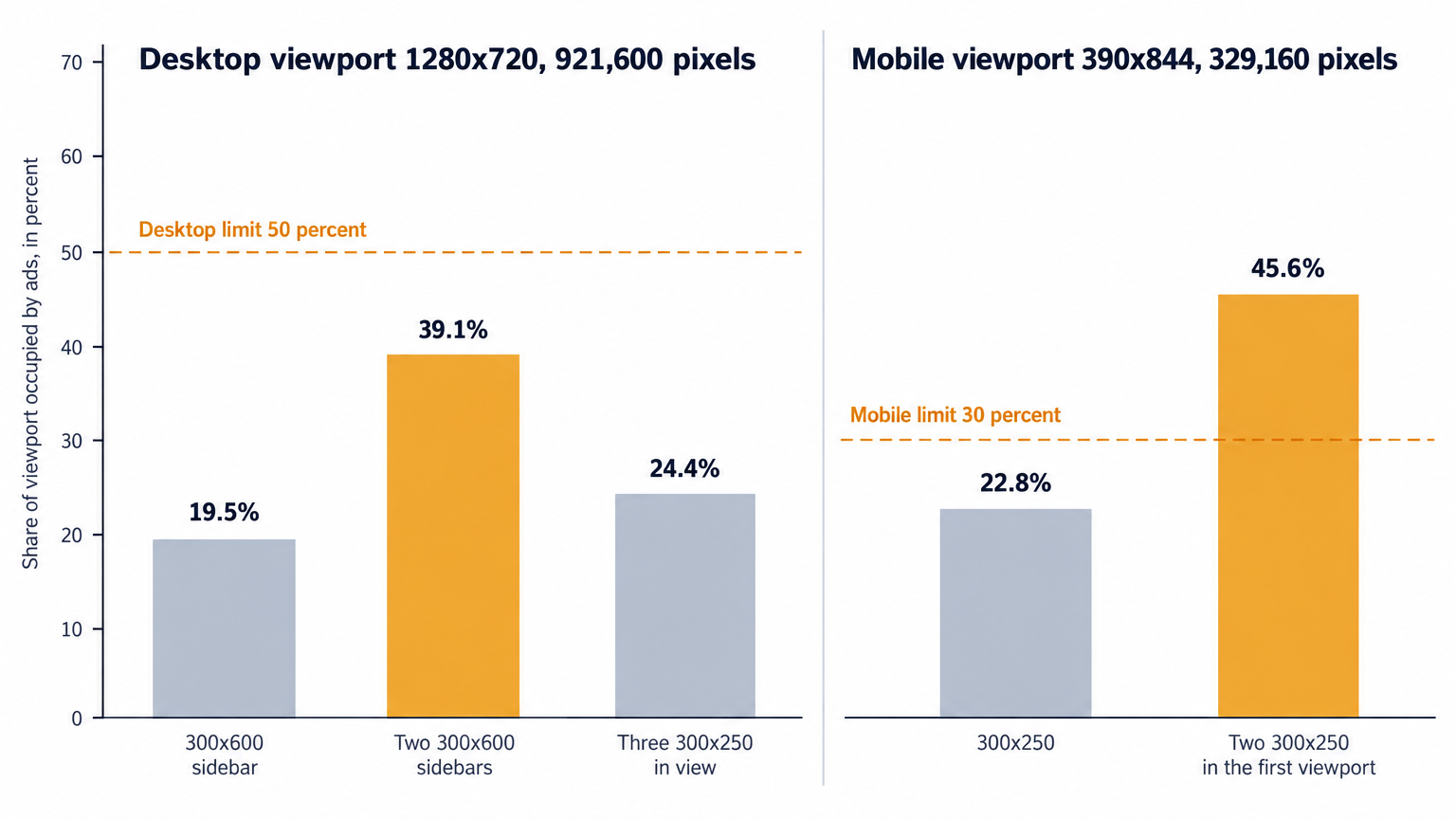
Three consequences follow from the definition. First, every ad counts toward the share regardless of who sold it: direct, house, affiliate and remnant units consume identical viewport pixels, so a page audited on programmatic slots alone understates its exposure. Second, the sticky video rule halves the desktop budget on video templates: a desktop page that runs a sticky video ad answers to 30 percent, not 50, and if you engineer the layout against the wrong number, it fails the moment video enters the page. Third, density is a viewport measurement read at render and at scroll, so lazy loading, sticky sidebars and infinite scroll all move it at runtime, in ways a static layout review never sees.
Two enforcement channels, one domain
Chrome is the harder channel. Google's Ad Experience Report lists the ad experiences on a site that violate the standards, and a Failing status means the report judges those experiences likely to annoy or mislead visitors. The publisher can fix the flagged experiences and request another review, and that loop matters because of what Chrome does with a failing site: Chrome began filtering ads on failing sites in the United States, Canada and Europe, with 30 days notice before filtering started, and extended filtering to all other global regions on July 9, 2019. Filtering applies at the site level, so one dense template on a low-traffic section can drag every compliant placement on the domain into the block. A tuning mistake becomes a domain-level revenue event.
Search is the quieter channel, and it polices a different part of the layout. Google's search guidance says interstitials should never obscure the entire page, banners should take only a small fraction of the screen, and legally required interstitials such as age gates count as exempt. An interstitial escapes the density percentage, but not this guidance, and a page can clear the density thresholds and still sit outside the search rules, because the two rulebooks cover different elements.
Both channels respond to layout, and both cost less to satisfy in design than to remediate after a Failing status lands. Treat the thresholds as hard constraints, then spend the remaining attention on economics.
Why the marginal slot earns less than the first
The first slot on a page earns the most: it renders first, loads with the highest viewability, and draws the deepest bid pool. Every slot after it earns less for structural reasons, and knowing them keeps the test protocol honest.
Viewability decays with depth. Buyers bid against expected viewability, so a unit far down the page clears at a fraction of the hero slot's rate even with identical creative and targeting. Auction behavior compounds the decay: buyers shade bids in first-price auctions where they expect thin competition, and deep, low-viewability slots on cluttered pages take the heaviest shading. A floor can push back, and our guide to auction mechanics and reserve prices covers the full chain, from expected-value ranking through first-price with bid shading to what a reserve price does to clearance when you prune inventory.
Each added slot also adds auction load. One more unit in the wrapper means one more request across every bidder on every pageview, pushing render later and layout shifts up. Server-side demand absorbs part of the latency cost; the engagement cost stays. Density also trades directly against content consumption: every few hundred pixels of ad stack push the headline or the first paragraph further down, and readers who never reach the content never scroll to the next ad either.
This is why session revenue, not page revenue, decides density tests. A layout can raise revenue per page while cutting pages per session by enough that total session revenue falls, and a page-level dashboard will not show the loss. Refresh sits outside the density math and offers a partial alternative: a viewable slot that refreshes on a set interval sells more impressions per pageview at zero pixel cost, but it inherits the same discipline. Refresh only what stays in view, keep intervals long enough for viewability to verify, and watch for buyer shading on refreshed impressions. On a template already at its density ceiling, refresh usually beats another slot.
Instrument density before you tune it
You cannot tune what you measure once a quarter. Take four measurements per template; together they produce a working picture:
- Designed density: compute the static pixel math above at the three or four most common viewport classes.
- Runtime density: use an IntersectionObserver or equivalent to sample visible ad pixels against viewport pixels at scroll milestones, and label every sample by template ID and viewport class.
- Slot-level profit and loss: track revenue, impressions, viewability and effective CPM by slot depth, so each slot shows its own contribution instead of hiding in a template average.
- Guardrails: track scroll depth distribution, pages per session, return rate, and CLS and LCP per template.
Sampling at scroll time matters as much as sampling at load. Lazy units that fire together can stack two or three ads into a single viewport, sticky units contribute their pixels to every sample once they pin, and infinite scroll changes the session-long picture even when each individual viewport looks clean. Runtime density is the number that predicts enforcement risk; designed density is the number you can actually engineer. The Ad Experience Report hands you a status and a list of violating experiences, not a per-template density readout, so build this instrumentation yourself.
Reporting speed decides test cadence. Across the thousands of publishers we work with, each above one million monthly pageviews, the teams that manage density well read slot-level results during the test, not after it. Our ten minute reporting console exists for exactly that loop: a density test on one template reads out while the demand mix that filled the slots is still the demand filling them, which is what makes the result safe to act on.
A removal-first test protocol
Most sites above a million monthly pageviews sit past their density optimum rather than short of it. Slot counts accrete through years of quarterly revenue pushes, redesigns that never removed anything, and partner requests. So the first serious test removes an ad rather than adding one, because removal answers the cleaner question: does the marginal slot carry revenue at all?
Run it per template, with everything else constant:
- Rank slots by net revenue and start with the weakest earner, usually the deepest in-content unit.
- Remove that slot and nothing else; keep every placement, floor and format identical.
- Split traffic by session, not by pageview, through an ad server key-value or a coin flip in the wrapper, and hold the assignment for the whole session so engagement effects stay attributable.
- Run two to four weeks, whole weekly cycles, so day-of-week patterns and buyer pacing wash out.
- Read session revenue first, then the guardrails: viewability of the remaining slots, scroll depth, pages per session, CLS.
- Apply a fixed rule. Session revenue holds or rises: retire the slot permanently. Revenue drops: restore it, then try a floor increase or a higher position for the same unit before abandoning the idea.
Then reverse the protocol where scroll data justifies it: add one slot at a deep attention point, common on long-form templates, and hold it to the same session revenue readout. Test density changes separately from format changes. Swapping a 300x250 for a 300x600 while adding a unit confounds two effects in one readout.
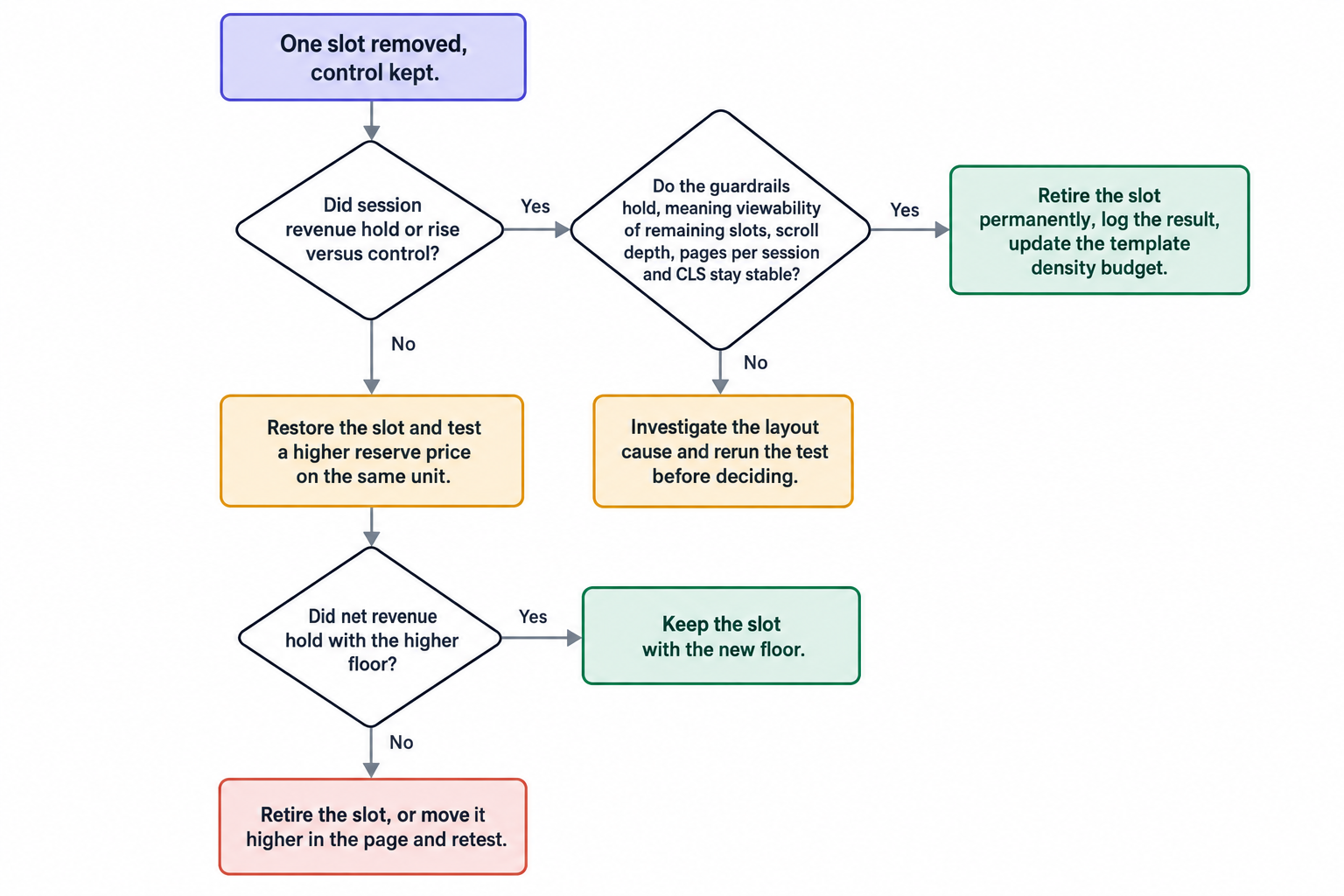
For agencies advising several publishers, this protocol travels well: every decision keys off session revenue and the same guardrail set, so results compare across properties. Log every outcome per template, because a density budget only stays honest when each decision leaves a record the next test can build on. Retest on a cadence too. Demand mix shifts across quarters, and a slot that failed its removal test in January might carry real revenue by October, so put each major template through a density review twice a year.
Set a density budget per template
The standards hand you a ceiling by device class. A budget is what you set per template, below the ceiling, with room for runtime variance. Reasonable starting points, not conclusions:
- Desktop article templates: design against 35 to 40 percent at most, holding headroom under the 50 percent threshold, and plan against 30 when the template runs a sticky video ad.
- Mobile article templates: design in the low 20s, because runtime variance closes the gap to 30 quickly.
- Long-form and listicle templates: the percentage matters less than cadence; govern by slots per 1,000 pixels of content height, since a ten-screen article can carry many units at low viewport share.
- Homepage templates: hold a tighter budget than article pages; the page exists to route traffic deeper, and ad stack slows that.
- Tool, calculator and login templates: near zero. Content is thin, the percentage spikes fast, and users arrived for a function, not a feed.
- Forum and UGC threads: post length varies, so measure the density distribution rather than the average, and cap units per thread page by count as well as by percent.
- Video pages: on desktop, sticky video plus a 300x600 companion can approach the 30 percent combined threshold before a single in-content unit counts.
Format choice shapes density as much as slot count. A 970x250 at the top of a desktop article and a 320x100 mobile anchor occupy very different shares of their viewports, and when the test says a format swap beats a slot count change, we support every IAB display size plus in-stream, out-stream, interstitial and CTV video formats. The decision rule stays the same either way: re-measure viewport share after the swap, not just the CPM.
Failure modes that spike density
Runtime density rarely matches designed density, and five patterns push pages over thresholds that looked safe in the design file:
- Lazy-load clusters: three units that fire together when a long section enters view can fill a viewport in one scroll event. Sample density at scroll time, not only at load.
- Infinite scroll: appending slots without a cap raises density across the session even when each viewport looks clean. Cap concurrent in-view units.
- Sticky sidebars: a pinned unit contributes its pixels to every sample after it engages. Sticky inventory counts, every time.
- Responsive resizing: units that expand across breakpoints shift the math by viewport class. Re-measure per class instead of trusting one layout number.
- House and affiliate fill: a house ad pays nothing and still occupies viewport share. Density counts it, and so does enforcement.
The last failure mode sits at the domain level. A single dense template, a redesign leftover on a section nobody watches, can produce the experiences that flip the whole site to Failing, and site-level filtering then takes every placement down with it. Audit the long tail of templates, not just the top five by traffic.
Fewer slots, better demand
An optimal density is a demand statement as much as a layout statement. Fewer slots with real viewability and real floors produce cleaner auction pressure than a dozen near-zero units, and cluttered pages leak value in the bid stream: buyers discount domains where attention looks thin, and that discount lands on the good slots too. When a removal test retires a slot, the floors and demand mix behind the remaining slots decide whether the revenue actually holds.
We work that side of the trade as OnlyMedia: an ad network, an SSP and an agency in one company. We integrate OpenRTB 2.6 seats and Prebid for header and server-side demand, we run a curated programmatic demand network for publishers above one million monthly pageviews, and we pay Net 30, CPM based, with no chasing and no sliding terms. The sequence is the same whoever fills the demand: measure viewport share, treat the thresholds as hard limits, and let session revenue settle the argument one slot at a time.