Bridging the Gap Between Editorial Layout and Ad Viewability
A display ad counts as viewable when at least 50 percent of its area stays in view for at least one second, and a video ad when at least 50 percent stays visible while playing for at least two seconds. An impression can serve, log, and bill without ever meeting either threshold. That gap belongs to layout: the ad server records the render, while the measurement standard records geometry and time. Placement, reserved space, and load timing decide which of the two records an impression lands on, and all three live in the editorial template.
The thresholds, and what they imply about layout
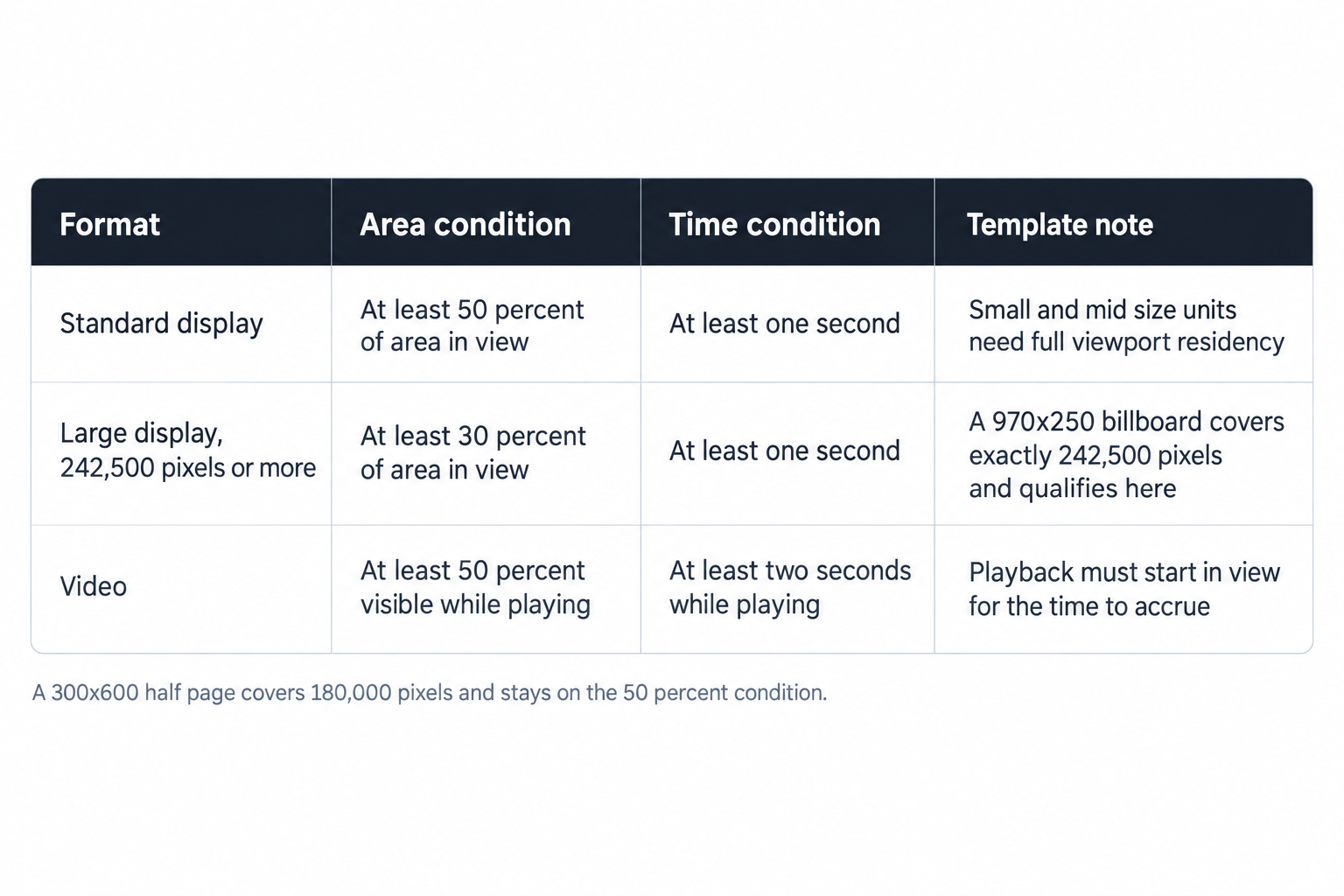
Google publishes the thresholds its measurement products apply, and the math changes with format and size. Three rules cover nearly every unit a large site runs:
- Standard display: at least 50 percent of the ad's area in view, for at least one second.
- Large display ads of 242,500 pixels or more: at least 30 percent of area in view, for at least one second.
- Video: at least 50 percent visible while playing, for at least two seconds.
The pixel line matters for template work. A 970x250 billboard covers exactly 242,500 pixels, so it qualifies at the 30 percent area threshold the moment it renders. A 300x600 half page, at 180,000 pixels, stays on the 50 percent line. Two slots in identical positions can carry different viewability risk purely because of the threshold each must clear. Because it needs only 30 percent of its area in view, a large format also tolerates partial occlusion that would fail a standard unit in the same spot.
Measurement samples the slot's geometry over time, and the area and duration conditions must hold together. For video, the two seconds must accrue while the unit plays, which means an out-stream player that starts below the viewport spends its playback where nobody sees it: tie player start to viewport entry, the same rule that governs lazy loaded display.
Served volume and viewable volume are different currencies. A slot on a fast-scrolled page can fill at a healthy rate, log every impression, and still hand buyers a fraction of the viewable time they priced. The buyers in our curated programmatic demand network bid against expected viewable rate, so a template that suppresses measurement pays on every impression, not only on the weakest slots. No demand-side optimization fixes a geometry problem; the fix belongs to the template.
Placement: three positions with data behind them
Google's Ad Manager guidance names three placements that correlate with higher measured viewability, and each has a mechanical explanation:
- Just below the top navigation bar, which measures higher than the very top of the page.
- Near the bottom of the screen, right above the fold.
- In line with main content, or inside content-rich areas.
The very top measures lower than the slot immediately beneath the navigation bar, and the mechanism is plain: sticky navigation bars and browser chrome occupy that strip, and readers cross it at their fastest scroll speed on the way to the headline. A slot just below the bar catches the first pause in that motion. A slot at the bottom edge of the first viewport enters view at the exact moment reading begins. In-content slots inherit dwell time: a reader mid-paragraph keeps the surrounding unit in view past the one-second mark, and past the two-second mark when the unit plays video.
"Content-rich areas" has a practical reading: between paragraphs, at section breaks, and adjacent to the main column, rather than in page chrome such as headers, footers, and comment rails. The reader's attention dwells where the words are, and the one-second threshold needs dwell more than it needs proximity to the top of the page. A short post with two paragraphs supports one in-content slot, not three; forcing the third pushes it into the footer zone where attention runs out.
The fold is a range, not a line. Viewport heights vary by device, browser, and zoom level, so define the fold per template as the tallest viewport that appears in meaningful volume, and keep the first slot inside it. Recheck the template every time the hero module changes, because a taller hero pushes the first slot out of the first viewport without anyone touching the ad code. Test position moves one at a time, against viewable rate by slot, per template; a position that wins on one template does not transfer automatically to another.
Reserved space: the only guaranteed fix
Header bidding inserts a delay between page parse and creative render. If the slot div carries no dimensions, the browser lays out the page, the auction resolves, the creative arrives, and the content reflows around it. The reader loses their place, and the slot spends its first measured moments moving. An impression that logs at render and then slides out of the viewport as the layout settles can fail the one-second threshold while the ad server still counts it as served.
Google's developer guidance states the only guaranteed fix: reserve sufficient space with CSS, most effectively a fixed height and width, or minimum dimensions, on the slot div. Reserving space with JavaScript defeats the purpose, because the script load itself can shift the layout. Put the dimensions in the stylesheet or the inline style of the container, never behind a load sequence.
A slot that accepts several sizes must reserve for the largest size in its size map. Smaller creatives render inside the reserved box and leave whitespace, a cosmetic cost; under-reserving buys shift, a measurement and reader cost. Match the size map to demand that actually exists: our format inventory covers every IAB display size plus in-stream, out-stream, interstitial and CTV video formats, so a reserved box always has a live demand path.
Responsive templates need the same discipline per breakpoint. Pair each breakpoint with its own size map and its own reserved box, using a min-height that matches the tallest creative the breakpoint requests, so the geometry stays stable while the width flexes.
Editorial templates cause the remaining shift. Unsized images, embeds without dimensions, and late-loading fonts move everything below them, and one unsized hero can push the first slot below the fold after the page settles. That is the worst failure mode in this set: the impression serves, and the ad never had a viewport. Ad operations owns the geometry of the slot div, the template owner owns everything else, and cumulative layout shift, a Core Web Vitals metric, carries the combined defect into search performance.
Lazy loading: serve ads only when necessary
Lazy loading, which Google also calls smart loading, serves ads only when necessary. Pages load faster, latency and CPU consumption drop, and the page fetches ads dynamically as slots approach the viewport. The performance case sells the feature, but the measurement case matters more: a slot that requests at the right distance reaches the viewport with its creative already rendered, and its impression starts the clock in view instead of below it.
The fetch distance is the tuning parameter, and both extremes fail. Fetch too early and slots render while off-screen: impressions log with no chance of a measured second, volume looks healthy, and viewable rate tells the truth. Fetch too late and the creative arrives after the reader has scrolled past, converting a viewable impression into an unviewable one. Set the distance to cover auction latency, and render at or near viewport entry.
On a long article with six in-content slots, lazy loading turns slots four through six into conditional inventory: they request only when the reader reaches them, which cuts wasted auctions and unviewed impressions at every scroll depth. At OnlyMedia we integrate OpenRTB 2.6 seats and Prebid for header and server-side demand, and we retest fetch distance whenever the demand mix changes, because auction latency moves with it. Lazy loading without reserved space reintroduces shift at the moment of render, so ship the two mechanics as a pair.
Auto-refresh slots carry their own rule: each refreshed impression must qualify on its own. A refresh that fires while the slot sits off-screen logs an impression with no chance of a measured second, and a refresh cycle tuned to time rather than position quietly converts your best-viewed slot into your worst. Gate refresh on the slot's in-view state.
Template patterns that suppress viewability
Some recurring editorial patterns cost viewability without anyone deciding to spend it. Audit for these before blaming the stack:
- Infinite scroll without pre-declared slots. The DOM appends a slot near the reader's current position, and the insertion shifts the content around it. Declare the slot div, with reserved dimensions, one module ahead of the reader.
- Accordions and collapsed sections. A slot inside a collapsed container renders with no area, so measurement cannot accrue while the impression logs anyway. Define the slot when the section expands, or move it outside the collapse.
- Late-loading embeds. Social post embeds and body video players resize after their scripts run, and everything below them moves. Give embeds fixed containers, the same rule as ad slots.
- Carousels and slideshows. Auto-advancing modules resize between slides and drag adjacent slots around with them. Reserve for the tallest slide and keep auto-advance away from ad positions.
- Comment sections and footers. These zones rarely earn their density. On mobile web, a 30 percent ceiling leaves little room for units that almost never accumulate a measured second.
- Desktop sidebars beside long articles. The article column scrolls while the sidebar empties, and the slot ends up beside content nobody reads. Prefer one more in-content unit over a sixth sidebar unit.
Pagination changes the trade: each page load re-runs the auction on a short, dense page with fresh viewability odds, while infinite scroll spreads the same inventory across a longer journey and leans harder on lazy loading to stay measurable. Neither approach fails by default; both fail without reserved geometry.
None of these is a demand problem, and none of them appears in a campaign report until viewable rate by slot makes it visible.
Anchors and side rails: concentration with ceilings
Anchor ads remain in view as the user scrolls, the user can dismiss them at any time, and the format complies with the Better Ads Standards. Three placements exist: top of page, bottom of page, and desktop side rails, which sit 5 to 25 pixels from the main content. Publishers add body padding so the anchor never covers content, and that padding belongs in the template stylesheet, not in a runtime adjustment.
The reservation sizes vary by device and placement, and the template should reserve to the largest size in each map:
- Mobile web, top or bottom of page: 320x50 and 320x100.
- Tablet, top or bottom of page: 728x90.
- Desktop, top or bottom of page: 728x90, 970x90, 980x90 and 990x90.
- Desktop side rails: 120x600, 160x600 and 180x500.
The Better Ads Standards set the ceilings that contain all of this. On desktop, ad density above 50 percent counts as a substandard experience, as do large sticky ads. On mobile web, the triggers are density above 30 percent, large sticky ads, and full-screen scrollover ads. A 2026 update adds desktop density above 30 percent combined with a sticky video ad, plus new mobile sticky video formats, and the Coalition assesses compliance from May 2026.
Sticky formats concentrate viewability, which is why they price well, and why the ceiling math changes under them. A desktop template running 35 percent density is compliant today; add a sticky video player and the same template fails the 2026 rule. The ceilings decide whether you may run these formats at all, and the measurement thresholds decide what they earn once they run. Measure density per template and per device, and model the May 2026 triggers before any video-heavy section ships.
The layout contract between the two desks
The recurring failure mode is organizational. Editorial ships a template, ad operations bolts slots on afterward, and measurement finds the problems weeks later, after traffic has already paid for them. Reverse the order: put a named slot map in the template specification before design sign-off, so the layout and the monetization plan move as one document.
A workable contract has five parts:
- A slot map per template: named slots, positions defined relative to editorial modules, reserved dimensions in CSS.
- A density budget per template, split by device, with the Better Ads ceilings and the May 2026 triggers as hard limits.
- Lazy loading parameters, with the fetch distance recorded per slot cluster.
- A sign-off rule: ad operations approves any change that moves a slot, resizes a container, or inserts a module above the first slot.
- A weekly review of viewable rate and layout shift, by slot, per template.
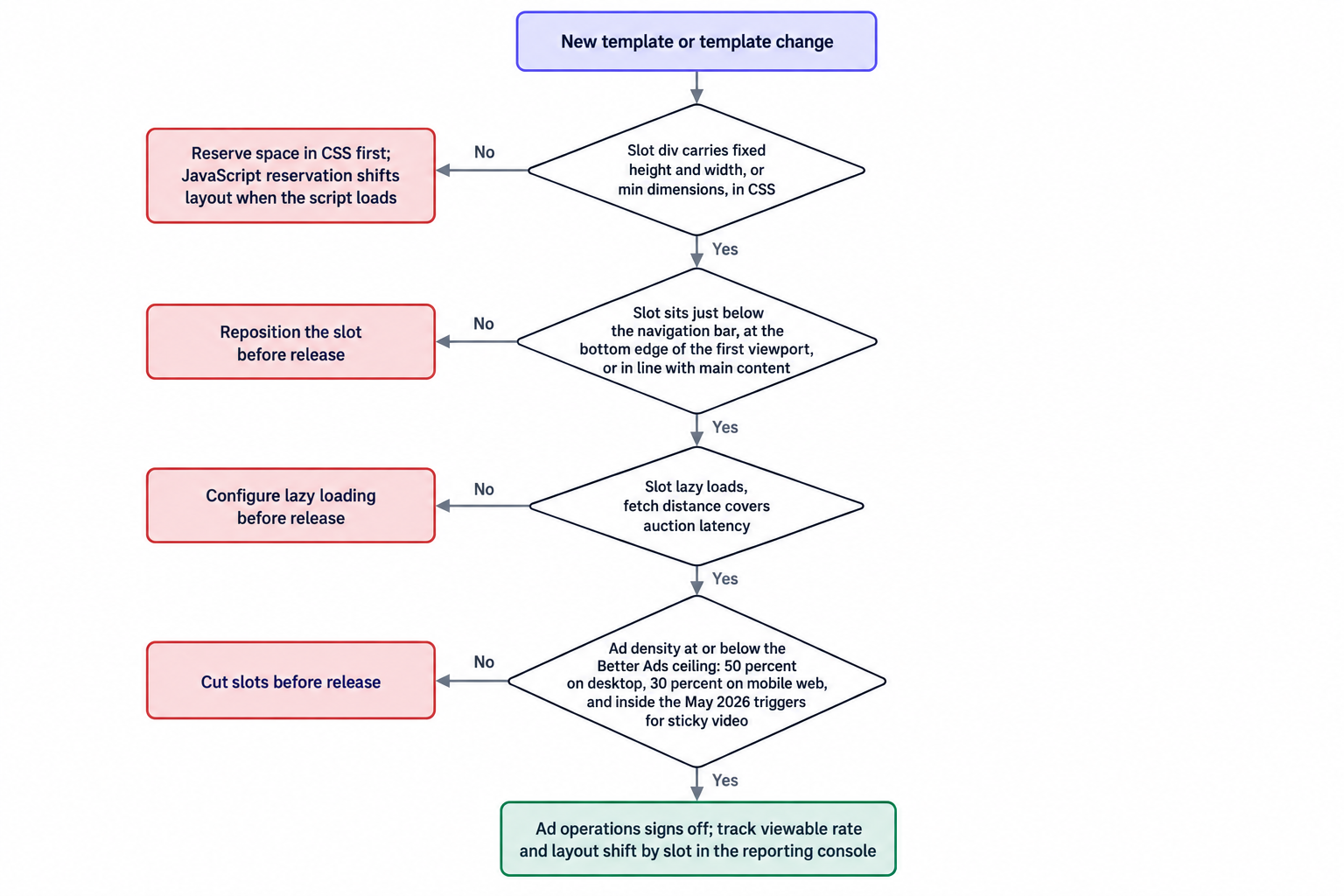
Track four numbers per template: viewable rate by slot, layout shift contribution by slot, time from request to render, and ad density per device. Viewable rate tells you which position underperforms; shift contribution tells you which container causes it; render time tells you whether the fetch distance or the demand path sets the limit; density tells you how close the template sits to the ceilings. Annotate every template change so the review can separate layout effects from demand effects.
Close the loop with measurement that moves at the speed of a template cycle. Our reporting console with API access refreshes every metric every ten minutes, so a layout change shows its effect the same morning, and the API feeds the same series into your own dashboards.
Agencies advising publisher clients should audit the template specification before the demand stack. Ask for the slot map, the density budget, and the shift numbers by template; the answers predict viewable rate more reliably than any demand-side report. A client with clean geometry wins on every demand path, including the ones they have not plugged in yet.
At OnlyMedia we are an ad network, an SSP and an agency in one company, and we work with thousands of publishers, each above one million monthly pageviews. Our publisher monetization terms pay Net 30, CPM based, with no chasing and no sliding terms, so the payout schedule stays fixed while the layout work runs.
Editorial layout and ad viewability are one system with two owners. The thresholds are public, the placement guidance is published, and the CSS reservation mechanism is guaranteed; the connecting workflow is the only variable. Teams that put the slot map inside the template specification stop paying for impressions that serve, log, and never reach the screen.