Auditing Your Ad Stack: A Comprehensive Quarterly Checklist for Revenue Health
Programmatic revenue fails quietly. A floor raised during a demand spike two quarters ago keeps clearing impressions at the wrong price, an ads.txt line disappears during a domain migration, a header bidding adapter stops returning bids after a bad release, and none of these events raises a single alert. The losses surface only when someone compares this quarter against the last one and asks why each number moved. A quarterly audit converts that quiet drift into a ranked list of fixable defects, and the order of the checks matters, because several of them depend on the baseline you capture first.
At OnlyMedia we run an ad network, an SSP and an agency in one company, so our audits have to cover demand quality, auction configuration and site health in a single pass. The sequence below follows the order we run every quarter. If you advise publishers rather than operate their stack, treat the same sequence as a due diligence script: each section produces an artifact you can request from the client, from the baseline exports to the payout variance log.
Capture the baseline before you change anything
Change nothing until the closing quarter's numbers exist somewhere permanent. An audit runs on deltas, and a CPM drop means little until the slot, device and country splits locate it. Capture the same report set every quarter, CPM, fill rate, ad requests, pageviews and revenue, broken out by country and device, with video reported separately, then archive the raw exports beside your notes.
Our reporting console with ten-minute refreshes keeps CPM, fill rate, ad requests, pageviews, revenue, country, device and video detail current while the audit runs, and its API access turns the snapshot into a script. Identical queries every quarter keep the deltas attributable, because hand-pulled reports drift in definition until the comparison stops meaning anything. Close the baseline with three checks:
- Export every metric for the closing quarter and the two before it, per slot, per country and per device, so each later finding has a comparison point.
- Note the ratio of ad requests to pageviews per slot; movement there flags lazy load changes, refresh changes or bot traffic before anything else does.
- Pull the change log: every floor move, bidder addition, layout change and resizing since the last audit. The line item audit will ask for it.
The baseline costs about an hour, and it decides whether every later conclusion holds. Resist the temptation to jump straight to the anomaly on screen, because an anomaly without a comparison point is just a number.
Verify file integrity: ads.txt, app-ads.txt and MCM
Ads.txt defects cost minutes to find and the most to ignore. Ad Manager accepts an ads.txt file even when the formatting is wrong or a line points at an account nobody ever linked, so the upload path offers no protection and verification belongs to the publisher. Each incorrect or missing entry fails in one of two directions: it blocks demand that cannot bid on your inventory, which is missed revenue, or it authorizes a reseller you never approved, which creates the opportunity for unauthorized sale of your inventory.
MCM delegation adds a hard dependency on the same files. Under Manage Inventory, a child site needs the parent's publisher ID inside its ads.txt before anyone can submit the site for review, so audit both directions: confirm your own file, then confirm that every child's file still carries your ID. A child that regenerates its ads.txt during a redesign can drop the ID and stall the delegation without throwing a single error. Clear the section with four checks:
- Fetch ads.txt and app-ads.txt from the live domains over HTTPS and diff them against your copy of record, because the CMS version and the served version do not always match.
- Validate each line: the account ID matches the partner's documented ID, and the DIRECT or RESELLER tag matches the actual relationship.
- Confirm that every MCM child's ads.txt still carries the parent publisher ID.
- Delete lines for partners you no longer sell through, because a stale authorization is unauthorized-sale exposure.
Every fix in this section costs minutes, which is why it goes early in a busy quarter. It also feeds the auction audit later, since the floor and seat checks reference this same partner list.
Audit delivery at the line item level
Underdelivery hides inside healthy totals, because a line item can pace to goal while passing up impressions it could have won. Ad Manager surfaces the diagnosis directly: the Troubleshoot tab on each line item shows health history, recent setting changes, historical forecasts and delivery spikes or dips, plus a pie chart of the most common reasons the line item skipped eligible ad requests. Read the pie chart before anything else, since the dominant reason tells you whether the fix lives in configuration, pacing or price. Correlate the delivery spikes and dips against the setting changes on the same screen, then cross-reference the setting changes against the change log from the baseline:
- Open the Troubleshoot tab for the line items that carry most of the quarter's revenue and read the non-delivery pie chart on each.
- Compare historical forecasts against actual delivery on direct campaigns, and investigate the largest gaps first.
- Check frequency caps, end dates and creative approvals on direct campaigns, because an expired or capped item leaves a silent inventory hole.
- Trace every setting change that never made the log back to a person and a reason.
An hour in this tab usually explains the anomalies the baseline surfaced. That dependency is exactly why the section sits between the baseline and the pricing work.
Pull viewability apart, slot by slot
Viewability prices itself into your CPMs whether you measure it or not, because buyers discount inventory they cannot verify. Active View reporting separates eligible, measurable and viewable impressions, and it exposes viewable percentage and average viewable time as columns. The thresholds come from the standard: an impression counts as viewable when at least 50 percent of the ad's area stays on screen for at least 1 second, and in-stream video needs 2 seconds. Video earns its own pass in the console, so keep the format split in the baseline exports.
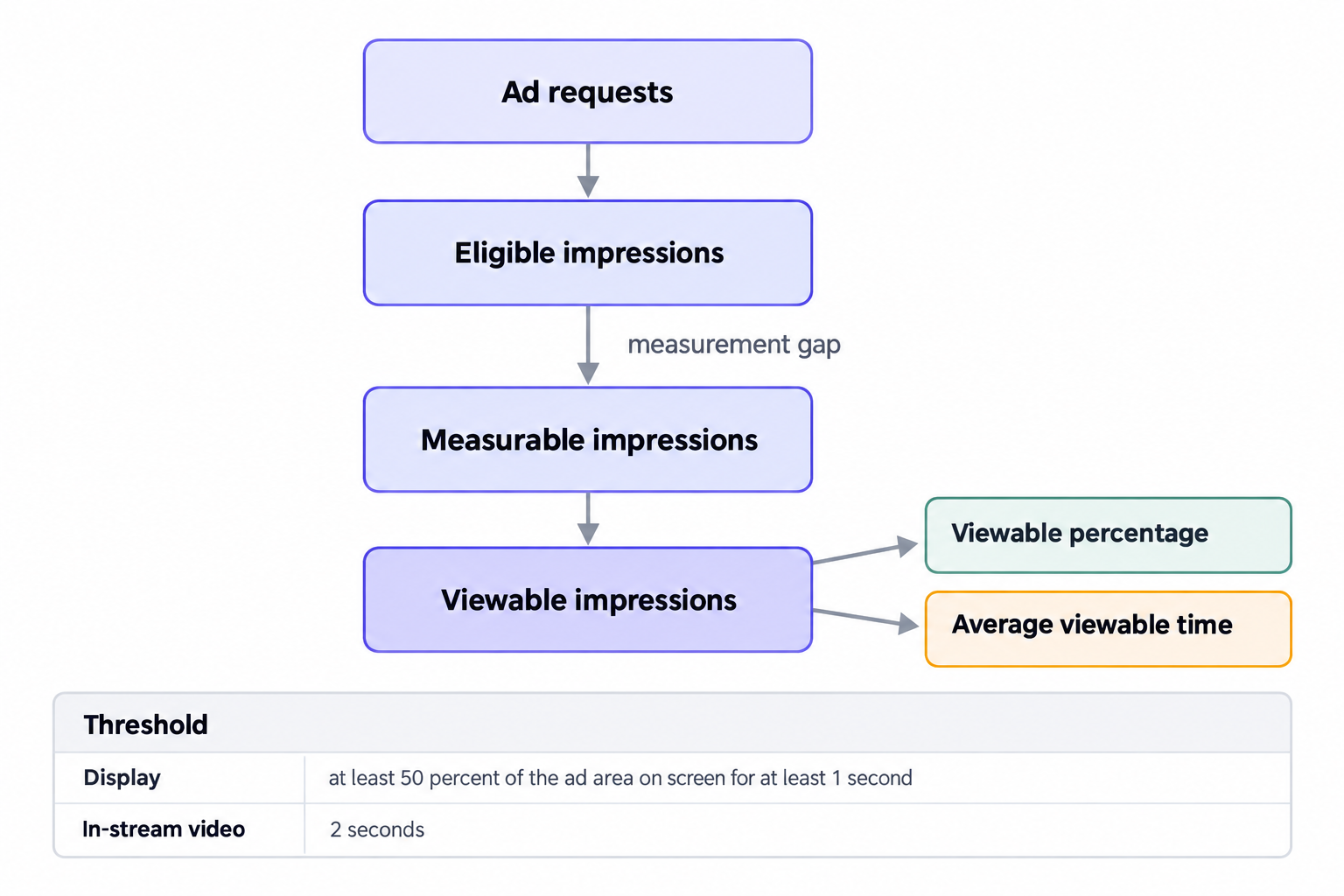
Audit per slot, never per site, because a blended average hides a below-the-fold unit dragging the number down while premium slots subsidize it. Low viewable percentage on a specific unit usually traces to lazy load thresholds set too deep, or to a refresh interval firing before the ad enters the viewport. Before you treat a viewability problem as a layout problem, check the gap between eligible and measurable impressions: a wide gap is a measurement problem, and layout work will not touch it. Run the slot-level checks:
- Rank ad units by viewable percentage and average viewable time for the quarter.
- Re-test lazy load thresholds after any layout change, because a redesign moves the fold.
- Check the eligible-to-measurable gap per unit before drawing conclusions about layout.
- Compare refresh intervals against average viewable time, since a refresh faster than the viewable window burns impressions buyers decline to pay for.
Slots that fail these checks should move to the pricing discussion with a discount attached, because buyers already price them that way. Fixing layout recovers more than raising floors ever will.
Inspect header bidding through bid rates and participation
Header bidding decays one adapter at a time. One bidder ships a breaking adapter release, another tightens its user matching, a third starts bidding only on your strongest geos, and gross revenue holds steady while the auction thins. Prebid supports a range of analytics adapter plugins for tracking header bidding performance, so the data exists as long as you install one, and the browser console alone cannot answer the two questions that matter. Bid rates show what an adapter pays when it bids, participation shows how often it bids at all, and the pair tells you whether a bid is meaningful. A high bid rate with collapsing participation means a bidder cherry-picking your best inventory, and healthy participation with a sinking bid rate means a bidder losing auctions on price. Work the section with four checks:
- Review bid rates and participation per adapter against the previous quarter.
- Prune adapters with collapsed participation, then watch two weeks of delivery closely, because removing an adapter also removes the pressure it placed on every other bid.
- Hunt duplicate demand paths, one buyer reaching you through both a header seat and the ad server, since a buyer competing against itself does not raise your clearing price.
- Measure how long the header actually waits against how long real bids take to arrive, and trim the difference.
When findings push you toward new floors or timeouts, ground the change in the auction math first. Our notes on first-price auction mechanics cover expected-value ranking, bid shading and reserve prices, and they prevent the most common mistake at this stage: tuning one variable while the ranking logic quietly compensates for another.
Re-examine auction configuration and floors
Floors drift because nobody schedules their removal. Someone raises a floor during a demand spike, the spike passes, and the floor keeps converting marginal impressions into unsold ones for two more quarters. Audit each floor against the current bid distribution, not against the distribution that justified it.
Where demand runs through our SSP, one unified auction per impression takes AdX via MCM, Prebid and OpenRTB seats, with managed floors that we maintain on your behalf. The audit question there is whether those floors still match the demand mix, not whether the auction runs. Publishers operating parallel demand paths should apply the same test to every floor they control directly:
- List every floor by slot and geo with the date it last changed, and retest anything untouched for two quarters.
- Compare floor levels against actual clearing prices, because a floor sitting above the bid distribution produces unsold impressions, not higher revenue.
- Confirm that each demand path, AdX via MCM, header seats and OpenRTB seats, maps to a current ads.txt line, which closes the loop with the file audit.
- Change one floor variable at a time and log it where the next audit will read it.
The floor section ends the pricing work for a reason: it consumes the outputs of every earlier section. The baseline locates the weak slot, the header audit names the bidder, and the file audit confirms which partners may bid at all.
Clear the ad quality backlog
Ad quality defects reach users faster than they reach any dashboard. The Ad review center's Unreviewed tab lists the ads that appeared on your site in the last 30 days, which turns a quarterly sweep into a complete policy audit rather than a reaction to complaints. Block first and tolerate second, because a redirect or autoplay creative costs session time on every impression it serves, and users blame the site, never the buyer. Sweep with three checks:
- Act on every ad the Unreviewed tab shows from the last 30 days.
- Match user complaints and support tickets against the creatives in review, since the formats users flag cluster around redirect, autoplay and intrusive interstitial behavior.
- Verify that category blocks still match your editorial standards after any content strategy change.
End the sweep with a count of blocked ads and the categories they cluster in. The pattern tells you which demand sources to renegotiate or drop before the next quarter.
Reconcile payouts and audit the terms
The final section protects the money itself. Reconcile the ad server's revenue against every partner statement, line by line, and treat any variance beyond rounding as a defect with a specific cause. Payment terms deserve the same scrutiny as payment amounts, because a term that slid from Net 30 to Net 90 without a contract change is a price cut nobody agreed to.
We work with thousands of publishers, each above one million monthly pageviews, through our curated programmatic demand network. At OnlyMedia we pay Net 30, CPM based, with no chasing and no sliding terms, and those terms set the benchmark for the questions below. Hold every other partner to the same standard you would ask of us: what are the terms, when did they last change, and what did the most recent payout cost in delay? Close the audit with three checks:
- Reconcile revenue per partner against statements, and log every variance with its resolution.
- Record current payment terms and flag any that changed since the last audit.
- Rank partners by realized payment date, not by headline CPM, and price chronic delay into next quarter's allocations.
Terms sit at the end of the audit deliberately, because they only change once a quarter of evidence exists. Take the variance log into the renewal conversation and price delay openly.
Turn findings into a fix order
An audit that ends as a document failed, because the deliverable is a ranked list, not a report. Score every finding by recoverable revenue per hour of work: file integrity fixes cost minutes and go first, measurement and delivery fixes follow, and pricing experiments go last, one variable at a time, since each one needs a full quarter to read. Attach the baseline exports to the audit file, because next quarter's audit starts from them. Assign the audit an owner, a calendar slot and a definition of done: the ranked list, the updated change log, the archived exports.
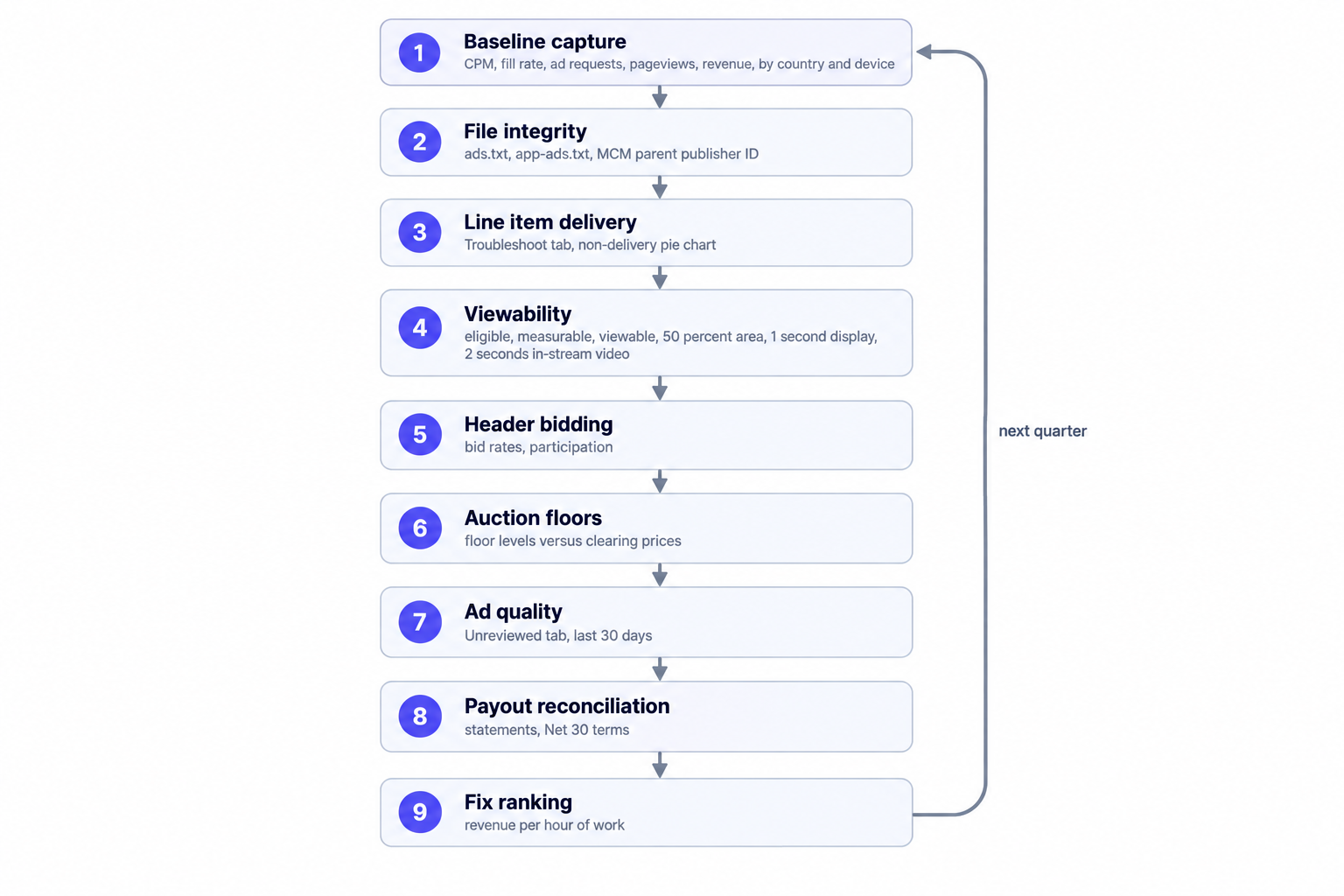
Run the full sequence every quarter and no defect survives longer than ninety days. That bounded exposure, more than any single finding, is what the checklist pays back.